Judge my shitty vibe code please
from tron@midwest.social to jellyfin@lemmy.ml on 21 Nov 2025 22:07
https://midwest.social/post/39140511
from tron@midwest.social to jellyfin@lemmy.ml on 21 Nov 2025 22:07
https://midwest.social/post/39140511
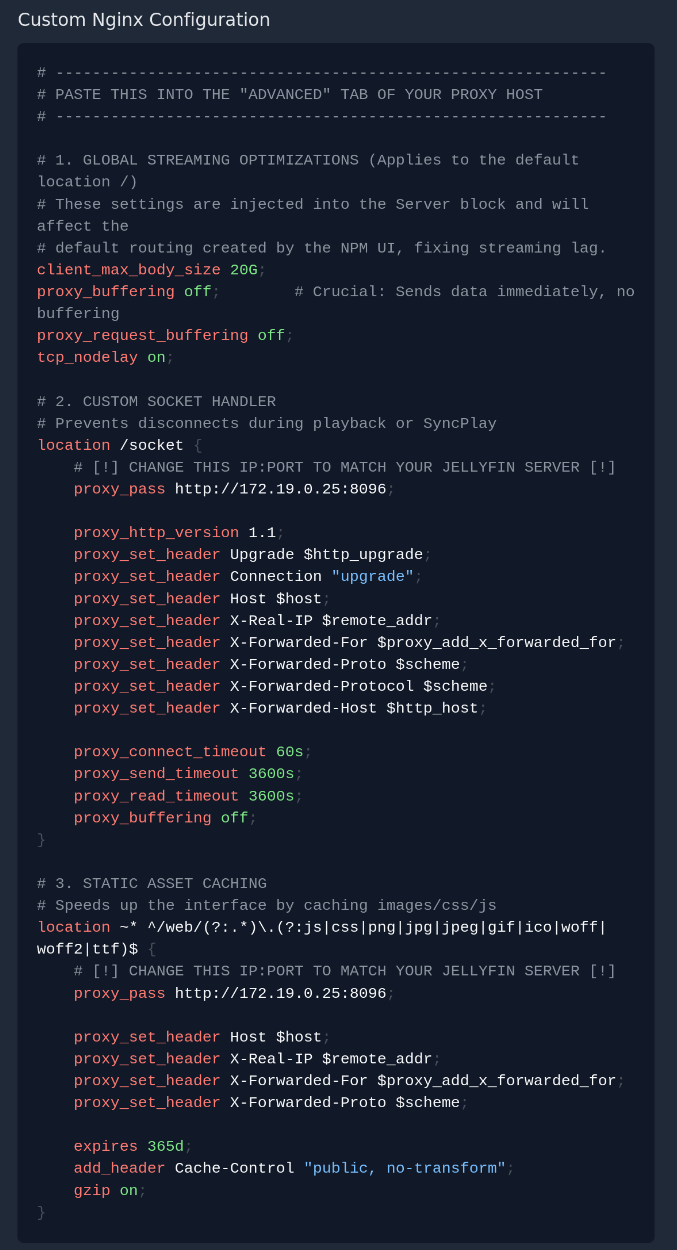
So long story short here: I’m using AI to write this Nginx Proxy Manager advanced config for Jellyfin because I’ve been having lots of issues with videos starting and stopping. Am I stupid? Any advice would be welcome!
threaded - newest
dont
lol. I don’t even review my coworker’s AI slop code. I’m not starting now.
it’s not stupid. i have pretty successfully done some NixOS work flying basically blind with an LLM guiding the way.
ask follow up questions. “can you show me in the docs where this is defined”, “why did you add this line here”, etc
you’re going to have to understand this config eventually. the LLM will start to get confused if you’re trying to squash a weird bug and you’re just chastising it. it will always tell you you’re right even when you aren’t.
document everything with comments and in git
Caddy is better :P
Do you have problems with videos if you don’t use the proxy?
Using AI is stupid, yes. Go truly learn it yourself if you want to know how to do something.
Do you understand the code, what it’s doing, and why it’s doing that? If not, then do not use an LLM for it.
If a human didn’t write it, why should a human review it.
Not sure how well that will fly, does it pass a config test?
Also here is a working server block that I use and works fine everywhere
server { listen server IP:80; listen server IP:443 ssl; ## listen for ipv4; this line is default and implied http2 on; server_name jellyfin.example.com; root /srv/www/holding; index index.php index.html index.htm; #SSL setting ssl_certificate /etc/letsencrypt/live/wildcard_cert/fullchain.pem; ssl_certificate_key /etc/letsencrypt/live/wildcard_cert/privkey.pem; add_header Strict-Transport-Security "max-age=15768000; includeSubdomains; preload"; # Note that Diaspora has a client side check set at 4M client_max_body_size 512M; client_body_buffer_size 256K; access_log /var/log/nginx/jellyfin-access.log main; location = / { return 302 https://$host/web/; } location / { proxy_pass http://jellyfin/; proxy_http_version 1.1; proxy_set_header Upgrade $http_upgrade; proxy_set_header Connection "upgrade"; proxy_set_header Host $http_host; proxy_set_header X-Real-IP $remote_addr; proxy_set_header X-Forwarded-For $proxy_add_x_forwarded_for; proxy_set_header X-Forwarded-Proto $scheme; proxy_set_header X-Forwarded-Protocol $scheme; proxy_set_header X-Forwarded-Host $http_host; proxy_redirect http:// https://; proxy_buffering off; } # location block for /web - This is purely for aesthetics so /web/#!/ works instead of having to go to /web/index.html/#!/ location = /web/ { # Proxy main Jellyfin traffic proxy_pass http://jellyfin/web/index.html; proxy_http_version 1.1; proxy_set_header Upgrade $http_upgrade; proxy_set_header Connection "upgrade"; proxy_set_header Host $host; proxy_set_header X-Real-IP $remote_addr; proxy_set_header X-Forwarded-For $proxy_add_x_forwarded_for; proxy_set_header X-Forwarded-Proto $scheme; proxy_set_header X-Forwarded-Protocol $scheme; proxy_set_header X-Forwarded-Host $http_host; } location /socket { # Proxy Jellyfin Websockets traffic proxy_pass http://jellyfin/; proxy_http_version 1.1; proxy_set_header Upgrade $http_upgrade; proxy_set_header Connection "upgrade"; proxy_set_header Host $host; proxy_set_header X-Real-IP $remote_addr; proxy_set_header X-Forwarded-For $proxy_add_x_forwarded_for; proxy_set_header X-Forwarded-Proto $scheme; proxy_set_header X-Forwarded-Protocol $scheme;Thanks, you’re reply made my day after all the negative comments. I’m a home hobbyist with zero training, so a lot of this stuff is jibberish to me still. Looks like we have a lot of the same stuff going on, I just needed a sanity check. Anyway, I went ahead and deployed it a few days ago and it seems to be very functional and snappy so I guess if it works it works?
.