from mxdcodes@lemmy.world to selfhosted@lemmy.world on 12 Apr 2026 08:56
https://lemmy.world/post/45500976
Hi there,
recently there has been a post here about Colota and thought you might be interested in a short summary about Colota.
I am tracking my position since several years now mainly with Owntracks (and now Colota) and a simple postgres DB/table.
I am a fan of the indieweb and eat what you cook and with already some million location points collected I recognized some pattern in existing GPS trackers I wasn’t happy about:
- Battery consumption
- Duplicate points while staying in the same location for a long time
So I decided to build my own GPS tracker and called it Custom Location Tracker.
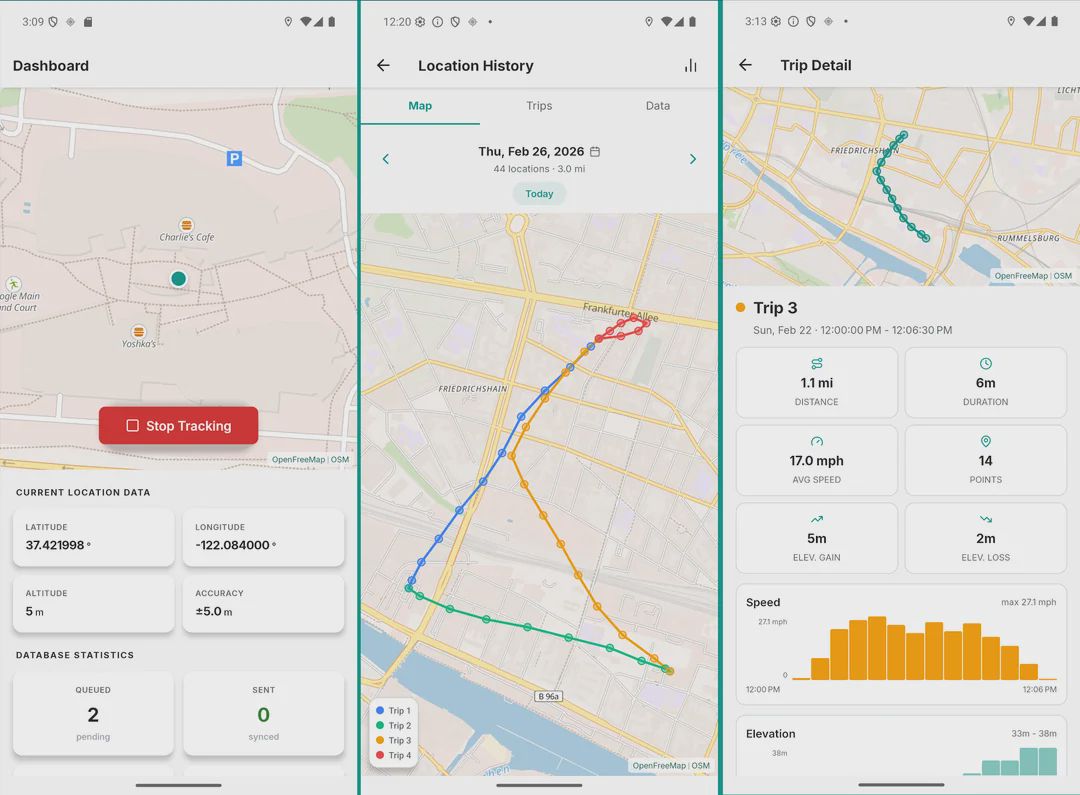
Improved battery consumption should come from disabling GPS entirely in so called “geofences” which are basically circles you draw on a map in the app. With GPS disabled in these you also won’t get duplicate points while staying at e.g. home or work.
The app is still quite new (actively developed since early 2026) but has already quite a lot of features which basically all came from user feedback. E.g.:
- Automatic Tracking profiles which apply different tracking settings while e.g. being connected to Android Auto, moving slower than 6km/h or while the phone is currently charging.
- The app works fully offline (map will not be visible then) but you can predownload map tiles from a tile server I selfhost or use your own tile server.
- You can define how locations are synced to your backend. E.g. only for a specific Wi-Fi SSID every 15min, once a day or with every location update.
Overall the app’s focus should move to be a mobile location history app. So basically Google Timeline in a mobile app which also supports selfhosted backends (as backup).
The app is fully open-source AGPL-3.0, has no ads, analytics or telemetry and only sends data to your own server (if you want to).
You can download two versions.
- Google Play store which uses Fused Location Provider and therefore uses Google APIs. Also works with the sandboxed version by GrapheneOS and microG.
- FOSS version which uses Android’s native GPS provider with a network location fallback. Available on IzzyOnDroid and hopefully someday on F-droid.
Both can be also downloaded directly from the repo.
threaded - newest
Thank you for sharing. Is this information encrypted? Doesn’t seem safe to use without that…
All location data is stored locally on device in a (unecrypted) SQLite DB. Auth headers (Bearer tokens, Basic auth) are stored using Android’s EncryptedSharedPreferences. HTTPS is enforced for all public endpoints. HTTP is only allowed for private/local network addresses (192.168.x.x, etc.) for self-hosted setups. For a app where the user controls both endpoints, I think that’s a reasonable tradeoff (colota.app/privacy-policy/). Probably makes sense to also mention that in a separate page in the docs for easier overview. Thank you for the question.
I absolutely agree with you. Such private data should be End-To-End-Encrypted.
I also agree with you both that location data is definitely personal data that should be protected. However, Colota stores data only on your own device and it’s never sent anywhere unless you configure a server and that server is out of Colota’s reach. End-To-End-Encryption doesn’t apply here since Colota is just one endpoint sending to the user’s own server. There’s no third party to encrypt against.
Colota is also meant to be an app which supports several “Google Timeline” alternatives like Dawarich, Reitti, Geopulse, etc. All these backends would have to support the same decryption which Colota offers, which is not realistic. You can also specify that data is only sent via an active VPN connection or just use it offline and use the built in file export as e.g. geojson.
Also Colota is a free and open source project. You can review the full source code to verify how your data is handled.
If the target server is compromised or taken by LEA the data is gone.
Laying the responsibility into the hands of the user is not ok for such an data aggregating service. Such highly critical, private and intime data should be protected and secure by default.
Not even transport encryption is enforced in the project. At first glance, http is allowed on local connections?!? Generate a self signed SSL cert on start and pin it in the app. Easy.
It is no excuse that other services do not follow these state of the art protection measures.
That’s true for any client that sends data to a server including your browser, email client or any other app. Colota doesn’t operate a server. If you’re concerned about server compromise, that’s a server-side hardening question (disk encryption, access controls, etc.) that’s outside the scope of a client app.
Colota is not a data aggregating service. It’s a local-first app. By default, no data leaves your device. You choose if and where to send it. That’s the opposite of aggregation. It’s the user being in full control, which is exactly what self-hosted software is for.
It is. HTTPS is enforced for all public endpoints. HTTP is only allowed for private/RFC1918 addresses. Forcing TLS on 192.168.x.x would require every self-hoster to set up certificates for their LAN, which is a real barrier for the target audience. Colota already supports self-signed certificates if you install the CA on your device.
I didn’t say that as an excuse. I explained why a client app that supports multiple independent backends can’t enforce payload encryption. Each backend would need to implement the same decryption. That’s a technical reality, not a lack of care about security.
Also again, a server is optional. It works offline and you can just export files with the data from the app.
Most projects in the self-hosted space put the load of transport security on the user or another system, including big ones like Immich.
Not sure why you’ve chosen to be indignant about this particular implementation.
We are talking about a tracking App. Most selfhosted projects do not store such private data. You may can mage the argument for immich but only for ppl who take a picture every 5 min.
That is patently not true, in the self-hosted space or otherwise.
If you want to take some kind of the security stance on pii or other personal data, you may want to take a look at the app’s workflow first before making declarations of “inadequate security”. There are other considerations than simply slapping a self-signed cert on data in transit (or at rest, for that matter). URL encoding, secrets management, api structure, etc.
If you want to architect the security of your data using this app, it is much easier to simply encapsulate or encrypt the transport yourself. A VPN would be fine. An authentication proxy would be another.
Ultimately, your comments on security here need more and better context to meet a reasonable threshold of confronting the dev on it.
In security and development there is a statement, called “secure by default”. That means the default settings are secure. This would encapsulate something like enforced Transport encryption.
Does this mean that the config can not be changed to fit the thread model? No.
The default setting is that everything stays on-device. The user then can change the config to fit their own threat model, e.g. by adding a server, choosing HTTP for LAN, etc.
Thats like saying:
“The SSH Server configuration does not need to be secure because the SSH Server is turned off by default”
That’s an interesting reading of what I said, but not what I said. I didn’t write that security doesn’t matter because the server is off. I wrote that when nothing leaves the device by default, there is no attack surface to secure. That is the definition of secure by default.
Secure by default means the default configuration is safe. By default, Colota stores location data locally and exposes none of it. If you believe that somehow fails the secure-by-default standard, I’d genuinely like to understand how.
If your actual concern is what happens once a user configures a server, that’s a fair discussion but it’s a different one. I already addressed that above and I’d be curious to hear a specific objection to that setup rather than a general claim that it’s insecure. Server compromise risk is inherent to every self-hosted service. That’s not a Colota flaw, that’s the model. And “users shouldn’t have to manage their own infrastructure” is a philosophical position, not a vulnerability. One that doesn’t really fit a tool explicitly built for people who want exactly that control.
By default this applications allows when adding a server, that the communication is not encrypted between the app and the server. This should be configured by default to enforce TLS encryption. If someone would want to disable dis behavior and allow unencrypted communication, then this should take extra steps.
As i commented somewhere else, to say that since it is turned off it is secure by default, is like saying: “The SSH server is turned off by default so the configuration that comes with it does not need to be secure when shipped”
That’s not true. For public endpoints, HTTPS is enforced. You can’t use HTTP. For private IPs, yes HTTP is allowed. So “by default… not encrypted” is not correct and misleading.
Yes, this is what we’re discussing… Are you a bot? Or are you really not following the conversation?
Obviously no. But you keep dodging the point here. And instead of comming up with an argument against my point, you seem to try to attack me personally.
Encryption does not exist for third parties. It exists to protect sensitive data from malicious or state actors who might hack your server and steal the information for various purposes. Here in the US law enforcement is free to hack and steal and demand whatever they want.
I would prefer single-party encryption vs. integration, personally. Could make it optional.
I appreciate your contributions but for me personally this is a dealbreaker.
E2E encryption is specifically designed for the third-party problem. Encrypting so a middleman can’t read your data.
If a server gets hacked where a user sent data from Colota there is nothing the app can do about it or to prevent it. Also you can create a backend which encrypts the data. Again: Colota does not offer a backend.
I don’t think it’s the job of an Android app to protect a server from government hacking attacks.
I understand the concern. The tradeoff is that backends like Dawarich or GeoPulse need to read the coordinates to build timelines, detect trips, display maps, etc. Encrypted blobs would make the server a simple backup at which point the local auto-export to Syncthing/Nextcloud achieves the same thing without the complexity. For pure backup, the offline + file export workflow already covers that use case. Also the app is offline-first. There is no server needed unless the user specifically configures that.
Fair enough, thanks for the feedback.
It can’t prevent the hack, it absolutely can protect the data, and make it useless. That’s the entire purpose of encryption.
Again, it’s not supposed to.
The server is needed for the same reason a server is needed for anything: to back up the data.
If you don’t want to implement it, that’s fine, I respect your decision, but there’s no reason to come here pretending not to understand its purpose.
It’s not that I don’t want. I can’t implement it because I don’t offer a server. You would have to address this to the backend developers (Dawarich, GeoPulse or even yourself) who actually store the data.
I am understanding your point, but apparently you are not understanding mine which is the actual use case of the app and it’s workflows and therefore make it look like it would miss basic security patterns. The whole “location history” ecosystem stores plaintext coordinates.
You don’t have to. You just have the app encrypt the data before it’s backed up and exported.
I understand the usecase but you’re acting like you don’t understand the purpose of encryption, for some reason suggesting that it’s supposed to prevent hacking, when that is not at all what it does.
.
I already explained several times why that’s not realistic for the selfhosted backends.
You could have just written at the beginning that you think it would be a good idea to implement (optional) encrypted backups Independent of the selfhosted backends. Then I would have answered, great idea!
But you continued to reply on a thread about end to end encryption where I specifically mentioned the selfhosted backends.
Have a good day!
You haven’t. You’ve only explained why you don’t want to do it, which is fair, but you keep presenting as if it’s not possible, which is not accurate. Lots of apps can and do create encrypted backups.
New day, new answer!
You started this conversation in a thread about E2E encryption and I responded in that context. Halfway through you shifted to encrypted local backups which you first called ‘single-party encryption’ and that’s a completely different thing. If that had been your original point we could have skipped this entire exchange. It’s a good idea which I already mentioned in the answer you replied to but you seem to have missed.
To clarify two things: I never said it was impossible. I said it wasn’t realistic in the context of the selfhosted backends we were discussing. Those are different statements. And yes, lots of apps do encrypted backups because they are backup apps. Colota isn’t. The existing export is for tools like QGIS or selfhosted backends and encrypting that data would break that use case entirely.
Encrypted import/export for backup is a separate feature that doesn’t exist yet, so there’s nothing here that’s badly implemented. It simply isn’t implemented at all.
I never shifted anything. I was talking about encrypted backups on a server. These can be encrypted locally before being synced to a server.
Nope, you literally just made that up. I didn’t say that and I don’t even know what that means.
…but it is.
My suggestion was that it could be…
You already have local backups that could be encrypted and then synced to a general storage server.
I said literally nothing about your implementation. You’re imagining things. Please read more attentively.
You entered a thread explicitly about E2E encryption started by ShortN0te and introduced “single-party encryption” or which later turned out to mean encrypted backups.
You wrote ‘I would prefer single-party encryption vs. integration, personally’ in this exact thread. That’s not something I made up.
I’d genuinely like to understand how.
This app has a specific purpose. It could have a encrypted backup feature but it won’t change it’s fundamental purpose which is viewing the location history.
The exported files are not designed as backups (even though they are being used as ones by existing users). They’re meant to be workable in other tools like QGIS, Strava or Komoot. Encrypting them would break that entirely.
Fair point. I misinterpreted that. No need to get personal.
.
That person replied to a thread I started, not the other way around. It was never about E2E. It was always about encrypted backups.
It’s not supposed to. It shouldn’t.
Then make it optional? Or don’t, I don’t care.
All phones are already disk encrypted these days. If you want disk encryption on your PC, you should enable it. Otherwise, it’s the responsibility of whatever backend you choose to handle encryption over the network.
No one is talking about a phone or a PC, we’re talking about a server.
Also phones and PCs are only encrypted at rest.
.
Who is “we”? I’m responding to your top level comment. You just asked the creator of an exclusively client-side app whether they support encryption. Not only is it reasonable for me to assume you mean client side encryption, it’s unreasonable for you to ask for server side encryption, because there is no server. It’s a BYOBackend situation.
Now if you’re asking for client-side encryption, something like Keepass where the file itself is encrypted, you have to use some form of auth to decrypt it on use, and you can store this file using whatever backend you want, that’s perfectly reasonable. I would still consider that encrypted at rest, but at least you could maybe separate encrypted reads from writes and limit the attack surface in the event of a breach.
Client-side encryption is not a novel concept.
That’s significantly more complicated and time-consuming.
Lol I don’t know what you want man, i didn’t realize this was one of those “digging my heels in because I don’t know how to be wrong” threads. I’ll let you do your thing, peace.
I honestly don’t know how to be more clear about this. It’s not complicated. I want client-side encryption, man.
LOL I didn’t know that either, but here you are!
I’ve been using this for a few weeks and it’s great. In addition to offline-first, it would be nice to be able to ask Colota: List my trips between date1 and date2 when I was near (ie within x meters from) point y.
I am planning to use this for a long time too, so an export/import data for when I change my phone would be nice. I see Export but not Import.
Also, being able to delete trips between date1 and date2 would be useful. Currently, you can delete 1-by-1 or recent trips only.
Glad it’s working well for you!
Why a dedicated backup server instead of just backing up to a local file that can then be backed up to a service of choice?
Also for profiles, it would make more sense to use Bluetooth to detect a vehicle or WiFi to detect when you’re home vs. Geofencing or Android Auto or speed. How can it tell when you leave the geofence if the GPS is off?
Probably phrased that wrong. There is no backup server. Users can create and add one if they like.
Colota offers out of the box file export (csv,geojson, gpx and kml) and supports hive_partitioning via variables in the endpoint (colota.app/docs/configuration/server-settings#url…).
Colota already uses WiFi for home detection (WiFi pause in geofence zones) and Android Auto/car mode for vehicle profiles.
GPS is only turned off by being connected to a WiFi or being motionless (or both) while being in a geozone. When wifi disconnects or/and motion is recognized the GPS starts again.
Bluetooth detection is the one thing that doesn’t exist. It could be a useful addition. I will note that. Thank you for the feedback!
No I understood the server is self-hosted…?
I see that but this should be an automatic backup process. Plus there’s no way I can see to IMPORT that data somewhere else.
When I use an app like Fitotrack, it automatically makes a backup file periodically and then is automatically backed up to my server with Nextcloud or Syncthing. I don’t need a dedicated server for it.
How can it do that when it didn’t ask me for an SSID? And what’s the point of the geofence if it doesn’t even use it anyway? I am cornfuse.
How is motion recognized without GPS?
Colota is client-only. There is no Colota server software. When you add a server endpoint in the settings, you’re pointing it at your own existing server (Dawarich, Home Assistant, Traccar or any HTTP endpoint). Colota doesn’t provide or require any server component. It just sends data where you tell it to.
Colota actually has automatic file export (Settings > Export Data > Auto-Export) that periodically exports to a directory on your device. From there Syncthing/Nextcloud can pick it up. Import is not yet available but is planned. There is no dedicated server needed and also not offered to setup. However you can create a webhook on your own server for the app if you want to. See e.g. colota.app/docs/integrations/custom-backend.
WiFi pause doesn’t use a specific SSID. It detects any unmetered network (WiFi/Ethernet) while you’re inside a geofence zone. The geofence defines where the pause should happen, the WiFi connection confirms you’re settled there and is used to detect when you leave it. Without the geofence, any WiFi connection would pause tracking everywhere.
Motion detection uses the device’s hardware motion sensor (if available). It’s a low-power sensor that fires when physical movement is detected.
Ok please forgive me, I’m unfamiliar with this terminology.
Oh, sick, I missed that somehow, thanks.
Sorry for the confusion on my part.
I still don’t see a way to import data? Doesn’t do any good to back it up if I can’t import it back in?
No worries.
Totally true. A import feature will be added with one of the upcoming releases.
Cool, thank you!
Acronyms, initialisms, abbreviations, contractions, and other phrases which expand to something larger, that I’ve seen in this thread:
10 acronyms in this thread; the most compressed thread commented on today has 7 acronyms.
[Thread #235 for this comm, first seen 12th Apr 2026, 12:40] [FAQ] [Full list] [Contact] [Source code]
How to tell when you leave the GPS-off area?
GPS is only turned off by being connected to a WiFi or being motionless (or both) while being in a geozone. When wifi disconnects or/and motion is recognized the GPS starts again. There is also an option to just not record locations in a geofence but then the GPS stays on and will still drain some battery.
Ah, got it. So you need WiFi if you want to reliably turn off GPS, that is a good solution.
In addition to wifi, Bluetooth beacons would be good too.
Seeing the same SSIDs (eg in a cinema) might also mean you are not moving, but then how can you tell you are not sitting near another train passenger with their hotspot on?
Yes, another user also already requested this (“Seeing the same SSIDs (eg in a cinema)”). Detecting reliable if you left an area without GPS is never 100% fool proof (e.g. airplane mode turned on or maybe the motion sensor is not even available) so I guess it makes sense to combine different sensors. Seeing same SSID and bluetooth is definitely on the test it out list.
Looks like a good starting point for municipalities implementing live bus location maps.
Can you port this to ios app store?
It’s using react native so it’s definitely possible. Currently it’s not planned, but it’s also not off the table forever (colota.app/docs/faq#is-there-an-ios-version)
Do you recommend the sandboxed play store / Fused location providor version over the fdroid or is it a negligible dkfference?
FusedLocationProvider (GMS version) is generally better for most users. It combines GPS, WiFi, cell tower and sensor data for faster GPS fixes and better battery efficiency. The FOSS version uses raw LocationManager with GPS as primary and network as fallback. It works but GPS fixes can be slower, especially indoors. But if avoiding (sandboxed) Play Services is a priority, the FOSS version works fine too.
Could OSM tiles be used? Ie direct the app to an OSM server and download their data?
I’ve no idea how tiles work, so this may be an absurd question 🙂
I’m currently using GPSLogger, but Home Assistant’s integration for it can’t handle >1 device… if I install your app on multiple devices, can Home Assistant distinguish between them? Ie does the data nclude a DeviceID of some kind?
Edit: ok, I think I’ve found the answer in your Home Assistant documentation
Not an absurd question at all. The app uses vector data for the map. Public OpenStreetMap server’s only offer raster data which is not compatible and would need way more storage to cover the same area downloaded. Also downloading tiles from openstreetmap servers would violate their tile usage policy.
However there are alternatives e.g. openfreemap.org. I actually had OpenFreemap used before for the app but it uses Cloudflare as CDN which doesn’t align with the privacy policy I want to offer for the app which is the reason I setup a own server (vps) which just directly serves the tiles (colota.app/docs/guides/tile-server). Also if I would use a external tile server which may go offline for whatever reason there would be nothing I could do about it.
Basically you could use any tile sever which provides mbtiles but I don’t know any other free options.
Yes it either works with the Colota integration which needs a custom payload attribute to distinguish different devices (e.g. “tid”: “colota”) or you could use also the Owntracks integration (see colota.app/docs/integrations/home-assistant). The API format sent from colota is completly editable.
Thanks for the background on the tiles.
Yeah, from my PoV, I’d like to use the OSM data that’s already on my phone (from other OSM based apps), but I understand your point.
So, where’s your VPS? In EU?
FYI: Got the app installed, followed the instructions (which refers to a Home Assistant template that doesn’t exist on the app?), modified the default custom template with
tidset to an identifier and … I appear to be at home 🙂Thank you
It’s a VPS hosted by netcup in germany (maps.mxd.codes)
Yes, you are right. I have to update the docs there. I removed the HA template because it basically just added the
tidwhich I think is quite easy to add manually.I’ve being using offline location tracking using a different app for some time now. This looked like a pretty elegant alternative, so I decided to give it a shot!
The app looks great, and very well thought through. The automation features really appeal to me (disabling tracking at home, automatically changing profiles, etc.)
One thing I wish it had was the ability to associate vehicles with trips (potentially, automatically, based on Bluetooth connections or other triggers). I like to track the category for each of my trips (car, bike, train, walk), as well as the specific vehicle (when applicable).
I haven’t tested too much yet, but it looks like you already have pretty robust trip tracking. It would be awesome if I could create a list of vehicles with types, and select a vehicle when starting a trip, or have it automatically set when connecting to a Bluetooth device.
In any case, this app looks great, and I appreciate the effort you’re putting into an open source project like this.
Thanks for the kind words! Vehicle/trip categories (car, bike, train, walk) + per-vehicle tracking is a great idea and fits well with the profile concept. Personally, I also want to skip other (activity) tracking apps which is the reason I also would love to have these features. Added the feature requests to the backlog. Thanks for taking your time trying out the app and giving feedback!
Hi mxdcodes. I have been using your app for the past month in a sort of testing phase with Darawich. I have used GPS Logger and Reitti since October last year, which is still running, but Colota offers a lot more exciting possibilities of data collection and so I’ll probably switch across pretty soon. I got hit by the bug a while back of it stopping once entering a geofence, but I saw that got fixed promptly so thanks for all of this.
I love all that you and others who code for the (wider) selfhosted community offer, so let me say that for every person criticizing your app and all the effort you have put in, there are hopefully 1000x more of us who are truly grateful for what you and others do. I find it odd that people who are concerned about having their location history hacked by someone are actually wanting to record their location history in the first place. Seems the obvious answer is to… not track your location history with ANY app.
Keep up the good work!
Thank you, really appreciate it! Glad to hear Colota is working well with Dawarich for you so far. Feedback and criticism are always welcome. Most of it has led to real improvements in the app. I think a casual forum thread is probably just not the best setting for deep technical discussions, where context shifts quickly, everyone has a different background and nuance gets lost.