What could be causing HTTP Error: 403 when trying to connect to my I2P site that's hosted using nginx?
from graysonuniverse@sh.itjust.works to selfhosted@lemmy.world on 26 Dec 2025 22:12
https://sh.itjust.works/post/52298822
from graysonuniverse@sh.itjust.works to selfhosted@lemmy.world on 26 Dec 2025 22:12
https://sh.itjust.works/post/52298822
The nginx server block is listening on a port other than 80, if that matters. It’s all my VPN provider will allow me to forward.
server {
	listen [PORT];
	server_name mysite.i2p;

	location / {
		proxy_pass http://127.0.0.1:7657/;
		proxy_set_header Host $host;
		proxy_set_header X-Real-IP $remote_addr;
		proxy_set_header X-Forwarded-For $proxy_add_x_forwarded_for;
	}
}
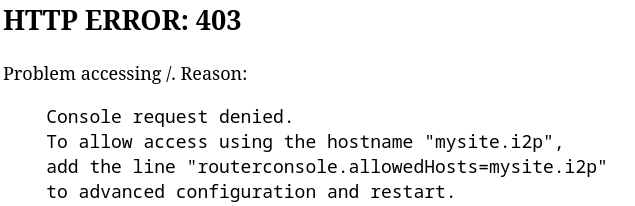
threaded - newest
Not to sound snarky but did you follow the instruction in the error message?
Where is the ‘advanced configuration’?
The answer is literally in your screenshot.
I think that’s misleading. I doubt OP wants to access the router console with this name.
port 7657 is to the router console, do you really want that? if no, you need to check the tunnel manager for the port configured for your eepsite. its in the I2P Hidden Services list. the default entry uses port 7658
if you followed the advice of others to change the advanced config, you should probably revert this change because you don’t need it.
btw sometimes it may be useful to also expose the router console. but since that’s only for you, you don’t want others using it, configure an encrypted leaseset for it, which makes the router console’s eepsite invisible to others on the network. you should keep the router console’s authentication when you do this. geti2p.net/en/…/Level-Up-Encrypted-Leasesets
Thank you so much. This explained it clearly and your fix worked.
that error is coming from I2P, not nginx
so good news? your nginx configuration is probably fine
bad news? I know fuck all about I2P. assuming you’re intending to reach the “router console”, you could probably follow the suggested configuration change in the error message to Do That Thing
Did you try what your error message suggests? Also didn’t know ybat nginx could do i2p, unless thats new or you’re using some extension
Right now it looks like you trying to expose your i2p console via i2p I would not do it. If you need remote access I would use tailscale this is how I have my setup.