HelixNotes - a local markdown note-taking app (Rust + Tauri, AGPL-3.0)
(helixnotes.com)
from ArkHost@lemmy.world to selfhosted@lemmy.world on 15 Feb 2026 00:30
https://lemmy.world/post/43147928
from ArkHost@lemmy.world to selfhosted@lemmy.world on 15 Feb 2026 00:30
https://lemmy.world/post/43147928
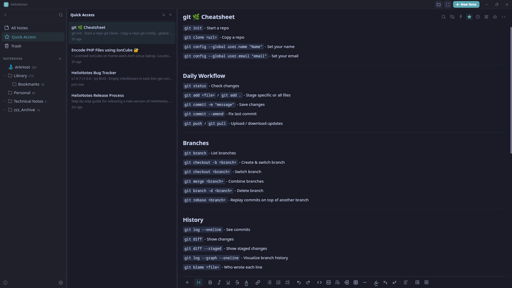
I built a note-taking app because the one I wanted didn’t exist. Clean UI, local .md files, no cloud, no account.
Built with Rust + Tauri 2.0 + SvelteKit. Full-text search powered by Tantivy. Graph view, AI writing tools (bring your own key), Obsidian import, version history.
Available for Linux (AppImage, APT, AUR), Windows, and macOS. Source: codeberg.org/ArkHost/HelixNotes
threaded - newest
Not to be confused with helix the TUI text editor
Correct, this has nothing to do with the helix TUI text editor in any way.
That was gonna be my question.
Oh hey I’ve been looking for “obsidian but with version history “ for a bit now.
Give HelixNotes a try :)
Since this looks to be similar to Obsidian, why not name it something else like it, but without the Obsidian name?
I’ll need to do some numerology on that….
EDIT: On the note of Obsidian, my producer and I use it all the time, however, there is another one that someone in a community I’m in looked at, that being Trilium Next. Judging by the looks, it’s got similarities to Trilium, which is actually pretty nice.
The name comes from the double helix. Structured but flexible, like how notes should be. Trilium is a solid project, but it stores notes in an SQLite database and runs on Electron. HelixNotes keeps everything as plain .md files and uses Tauri, so much lighter on resources.
Is Tauri like Electron, or SQLite, but faster and FOSS? Are either of those what I’m getting at?
Tauri is an alternative to Electron. Both are frameworks for building desktop apps with web technologies, but Electron bundles a full Chromium browser (which is why Electron apps use so much RAM). Tauri uses your OS’s native webview instead, much smaller, much lighter. Both are open source. The difference is resource usage.
Since my producer and I are using the Odin Project to potentially learn full-stack JS after the foundations course completion on our end (Rails is another option for full-stack development), we could certainly look into Tauri (even if we’re not done with that yet). I wonder, however, why many apps don’t use Tauri, and instead, Electron.
Electron came first and has a massive ecosystem. Most apps were built before Tauri was mature enough. Switching frameworks is expensive, so existing apps stay on Electron. New projects are increasingly picking Tauri though.
Looks like an interesting project!
Could you please consider publishing it to Flathub?
Not the developer, though that could be an option for sure. I’d highly recommend looking at the security holes for Flatpak, and it’s got a ton of them. They’re getting fixed, though I don’t even have Flatpak installed on my machine.
I’ve been hearing people suggest staying away from flatpaks, but I haven’t heard the reasons why. I guess that’s it?
Are there security issues specific to Flatpak? I would have thought it’d be more secure than Appimage, since it’s sandboxed.
While it is sandboxed, a Flatpak can have this happen to it (from the time): https://flatkill.org/
How does this differ from every other distribution method, though? You can just as easily do something malicious with an Appimage or Debian/rpm package.
It’s on the list. Flatpak packaging is coming.
Mac user her. I’ve been using Markflowy after MacDown stopped development. I will give this a shot.
Thank you for your work.
Hi OP. I am really enjoying using HelixNotes.
I love the way it looks and all the features. I was able to use the same folder I use MarkFlowy and Marknote.
My only critique is the
Ctrlkey in Windows and Linux menu shortcuts is usually changed toCmdfor Mac. It really isn’t a big deal but I think a lot of Mac users will notice this instantly. I tried creating an note withCmd+Nsince is the default for all other Mac apps. I saw the Shortcuts in the Info section and I was hoping you could customize the Keyboard Shortcuts, but you can’t.It isn’t a big deal with me. So far I am enjoying this more than MarkFlowy and Marknote. If you don’t change for whatever reason, I understand and I will continue to use your HelixNotes.
Again thank you for your work.
Me again. Last time tonight, I promise.
My favorite features so far, making the edit toolbar disappear in source mode and Focus mode. Quick access is also really useful.
One more thing I don’t like, it was adding a header to my edited notes.
Example:
This doesn’t look great in MacOS preview. This might be one of those things that it was simplest to just add this directly to the file rather than creating some kind of database or a bunch of dot files. Again, not a deal breaker for me. Would adding it to the bottom be possible instead?
Thank you.
Hi, not OP, but: that’s known as frontmatter, it’s somewhat widespread, and thus I suspect that it’s much more difficult to have it live at the end of your markdown files than in a separate file or db altogether - unless OP is already rolling their own markdown parser.
Interesting. Thank you for the info.
Really appreciate the detailed feedback.
You’re right about the Mac shortcuts - Cmd should replace Ctrl on macOS. That’s a bug, I’ll fix it.
As for the frontmatter - Jayjader is correct, it’s standard markdown frontmatter. It’s how HelixNotes tracks metadata without using a database or sidecar files. Moving it to the bottom would break compatibility with every other markdown tool that reads frontmatter. But I understand it’s not pretty in a plain preview - that’s the tradeoff for keeping everything in plain .md files with no hidden database.
Glad you’re enjoying it. Keep the feedback coming, this is exactly what helps improve the app.
Thank you for the explanation.
I will continue to use it and provide feedback. So far, really great.
I nearly take all my notes in markdown. I am always excited to try another open source markdown program.
HelixNotes is super polished.
Thanks!
Thanks, appreciate it!
Mac Cmd shortcuts fixed in v1.1.0, just shipped. Thanks for reporting it.
Plugin support?
Not at this stage. It’s something I’m considering but the priority is getting the core experience right first.
Totally understandable at this stage. As soon as it appears on the roadmap I’m in. Need my templater :)
Very nice. The screenshots look promising!
MacDown is pretty solid, but I’ve been looking at alternatives. Unfortunately, while MarkText may be feature-rich, latency is untenable. I think that one’s an Electron app.
Thanks! Latency was one of the main reasons I went with Tauri instead of Electron. HelixNotes launches instantly and stays light. Give it a try.
Your website says “No sync. No lock-in. No bullshit”
Would you mind elaborating on the thought there? Why no sync?
I use obsidian with self hosted live sync, my notes are mine and they live on my hardware, but they are always in sync between my devices. If I’m on my desktop and take notes, I can pull them up on my laptop or even my phone. With this, I can’t reference my notes (or update them) until I’m back on my desktop.
The line “No sync. No lock-in. No bullshit” tells me you’re opposed to it on principal, meaning you don’t intend to ever add the ability to sync, and that’s a nonstarter for me and a lot of people I image. I’d love to migrate from obsidian to something open source, and I’d love to potentially spend time working on contributing a self hosted live sync like feature, but I need to know if my work and pull request will be immediately rejected on a principal I’m not sure I understand?
I assume you could use syncthing to sync the notes.
Good question. “No sync” means no built-in cloud sync - not that sync is impossible. Your notes are plain .md files in a folder, so you can sync them with Syncthing, Nextcloud, rsync, Git, or anything else you already use. The app watches the filesystem for external changes and picks them up automatically.
The philosophy is: I don’t decide where your files go. You do.
As for contributions - absolutely welcome. PRs won’t be rejected on principle. If you want to work on a self-hosted sync feature, open an issue on Codeberg and let’s discuss the approach first. I’d love to see it.
Sounds good, I’m trying out the app and seeing if I can really use it to replace obsidian, and I might dedicate some time to contribute if I end up using it. I agree with your assessment that obsidian’s customization with its plugin eco system leads to it becoming a side project that you have to baby instead of just a note taking app.
I don’t use a lot of plugins on obsidian, but I use rely on a few that make organizing notes easier, mainly:
On sync, two problems with using “whatever” to sync entire vault:
Great feedback.
If you end up trying it and want to contribute, open issues on Codeberg for what you’d like to see. Contributions are very welcome.
Oh, forgot to ask, are mobile apps on the roadmap?
Obviously your chosen tech stack makes that difficult, but notes on the go are pretty essential.
I’m thinking about the mobile app in terms of how already. But it’s definitely on the roadmap.
Are there plans for mobile apps? In particular, obsidian and nextcloud don’t seem to work well together on android. Changes made to files via obsidian don’t get picked up by nextcloud unless I manually go sync the file. This might just be nextcloud’s app dropping the ball.
Never worked with any note taking apps except for Vim with customized snippets and rudamentary helper scripts.
While such an app seems very appealing, I haven’t seen any of them featuring the useful stuff, such as pluggable editor (in my case Vim or NeoVim), template support (day journal, meeting, README etc…), rendered fields (e.g.: today, author, or arbitrary values), support for pandoc rendering, doc metadata management (tags, keywords, related docs, links) or markers in text eg. @TODO etc… (idea being to aut. create lists of paragraps with such markers)
What’s the point of a note taking app that provides help with editing single docs and maybe with rendering to HTML, but doesn’t help organizing and remembering stuff?
Different use case. HelixNotes is for people who want a clean, simple note-taking app that works out of the box - not a customizable text processing pipeline. If Vim snippets work for you, stick with that. Not every tool needs to be for everyone.
Does this have anything to do with the Helix text editor?
No, completely separate project. Just a coincidence in naming.
Isn’t this basically just an Obsidian replacement then? I haven’t tried it, but reading the info in Codeberg does point to that.
If you want to try HelixNotes, be aware it overwrites the front-matter of notes you open (view only, no edit needed).
Hi ArkHost,
Obsidian user here. I tried HelixNotes for a couple of minutes and here’s my feedback:
view modebadge). But that opens the linked note in my default.mdviewer, not the HelixEditor itself. IMO view-mode should be visually distinct and also work together with source-mode (so I can edit in source mode and then click view-mode to see the rendered note).$ … $).Failed to acquire LockFile: LockBusy.Feel free to use my feedback however you want, or don’t. Personally, there’s more than one deal-breaker for me to switch from Obsidian to HelixNotes, without even considering the nice-to-have features added by all the plug-ins. I recommend you to listen to people who are more likely to use your editor than me, or are already using it. I hope my comment doesn’t come over too negatively. I tried to give honest feedback why personally I won’t use HelixNotes anytime soon. I wish you all the best.
You even overwrite previously existing front-matters. From just looking at a note. This is a fucking no-go! Luckily I was able to revert all the unwanted changes HelixNotes applied to my vault.
This is a warning for everyone who wants to try HelixNotes with an existing vault.
The import dialog warns you to make a backup before running as it modifies files in place. That said, the frontmatter overwrite on just viewing a note is a valid bug. I’ll fix that, notes should only be modified when you actually edit them.
Fixed in v1.1.0
Appreciate the honest feedback, doesn’t come over negatively at all, this is exactly what helps improve the app.
HelixNotes isn’t trying to be a replacement for Obsidian. It was a replacement for Obsidian for me, but different people have different needs. Thanks for taking the time.
If it were me, I’d have chosen a different name to avoid confusion with helix the editor.
I just downloaded. Looks amazing. I will try it out. Do you have a Patreon Page or something?
Thanks! No Patreon yet, but I’ll set something up. For now, the best support is feedback and bug reports.
So far it has been smooth sailing. But I will report. Only things Iam missing are:
maybe you can consider these for the future.
Great! Thanks for the feedback.
All 3 enhancements noted. Will be implemented in next release.
Update: The line shortcuts and line numbers will be in the next release. The side-by-side/split view requires a significant architecture refactor, so that one will take longer - it’s on the roadmap but not for the immediate next release.
Wow, that was really fast. Thank you very much!
You can now open a note in a separate window. This has been added in v1.1.6, along with other fixes and feature additions.
Notix. Notes + helix avoid confusion with the other app, Notix
Note taking App, AI in the front page… I don’t think you understand the point of taking notes.
AI is optional, disabled by default, and doesn’t even show in the UI unless you enable it. The app works fully offline with zero AI involvement.
Is the Markdown editor WYSIWYG, like Typora ?
You have both - the WYSIWYG editor and a way to switch to the Markdown editor.
I specifically asked whether the Markdown editor is WYSIWYG, like Typora, which isn’t the same thing as MS Word WYSIWYG.
Not like Typora, no. HelixNotes has a WYSIWYG editor and a source mode toggle, two separate views. Not inline markdown rendering.
All I know is tauri is the name given to Earth by the goa’uld. When did this came up? Everytime I blink another language appears
Tauri isn’t actually a language in this instance, it’s a framework to create WebView based GUI applications with Rust
Alright now I am learning something!
Thanks for all the feedback everyone. Just shipped v1.1.0 based on what was reported here today:
I need my notes with me. I use SiYuan and I’m more than happy
What does it do that obsidian doesn’t? Why would I switch? Genuinely interested.
Obsidian’s default editor is barebones, you need plugins to get a usable experience. HelixNotes gives you rich editing out of the box: formatting toolbar, slash commands, source mode toggle. No setup. It’s also not Electron. Rust + Tauri 2.0 & Svelte fraction of the RAM, launches instantly. Same philosophy though: local .md files, no cloud, no lock-in. If Obsidian works for you, no reason to switch.
What is about obsidian?
Is it possible to view files in the root of the vault?
Also, is it possible to show non
.mdfiles?My use case for the second question is that I have
.pdfand.xmlthat acompanies my notes. Having HelixEditor showing them as well (or opening them in system default editor) would be nice.Not ideal since you can’t easily sort by folder hierarchy but you can see your root files in All Notes.