What's the advantages/disadvantages to hosting Nextcloud with Docker vs the Package Center on a Synology?
from Zagorath@aussie.zone to selfhosted@lemmy.world on 12 Dec 2025 15:39
https://aussie.zone/post/27569122
from Zagorath@aussie.zone to selfhosted@lemmy.world on 12 Dec 2025 15:39
https://aussie.zone/post/27569122
Most of the threads I’ve found on other sites (both Reddit and the Synology forums) have basically said “go with Docker”. But what do you actually gain from this?
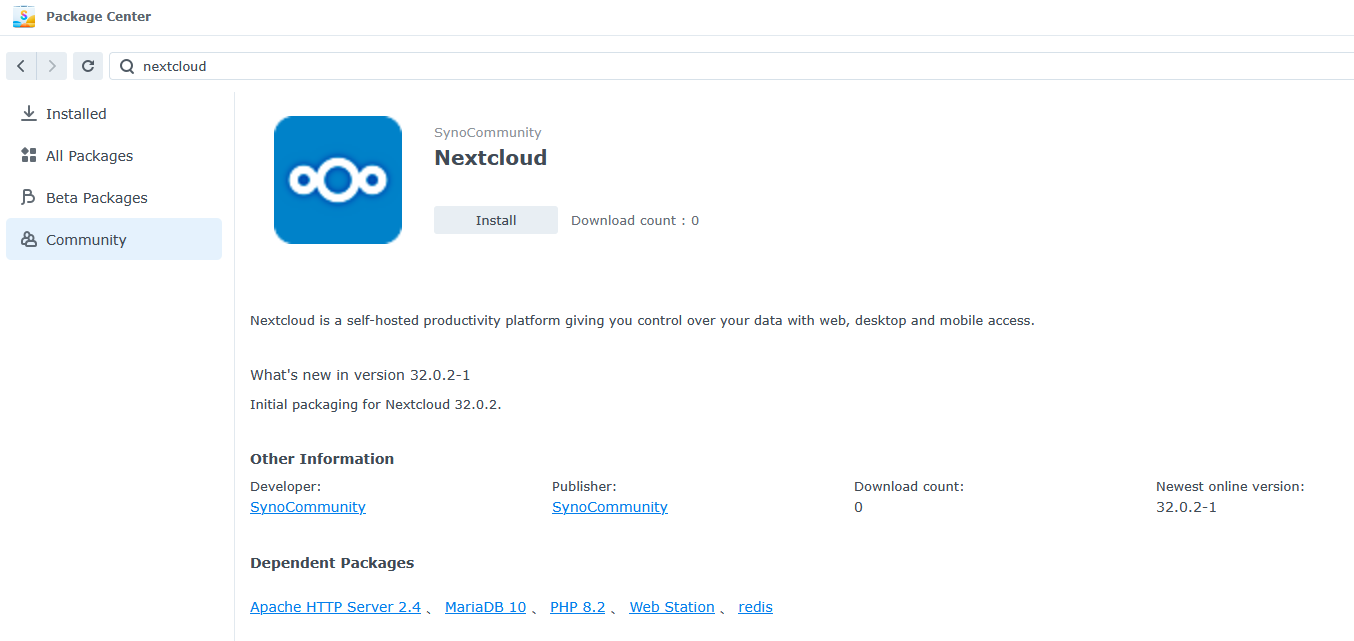
People suggest it’s more up-to-date, and maybe for some packages that’s true? But for Nextcloud specifically it looks pretty good. 32.0.3 came out 1 day ago and isn’t yet supported, but the version immediately preceding that, from 3 weeks ago, is.
I’ve never done Nextcloud before, but I would assume installing it via the Package Center would be way easier to install and to keep up-to-date than Docker. So what’s the reason everyone recommends Docker? Is it easier to extend?
threaded - newest
With nextcloud in particular, nextcloud is not just nextcloud.
It’s a bunch of additional optional services that may or may not work as-is on Synology. And the Synology package won’t come with all of them.
With docker, adding (or removing) additional services, such as Nextcloud Office, is comparatively simple.
Adding to this the new Nextcloud apps are just docker containers that Nextcloud manages for you. So docker is probably the better way to go.
So if I have a nextcloud VM since forever, should I consider switching to docker now? I seem to remember something way back when that vms were better than a docker install for nextcloud
As it’s a VM you should be fine as long as there’s enough resources for it to run its own docker instance. You just have to give it permission to control docker in the VM. And of course the VM must have docker.
Edit: it’s also possible to give it power over a remote docker instance as well. So you could do docker on the host PC and Nextcloud can manage it from the VM.
To my thinking the most important difference would be mobility. Using the Synology app would probably make setup somewhat easier, but if you ever decided to leave the Synology ecosystem migration would likely be more complicated. That by itself isn’t a recommendation one way or another, but it should definitely factor into your planning.
Isolation. The number one reason to use docker is isolation. If you’ve not tried to run half a dozen services on a single server then this may not mean much to you but it’s a “pretty big deal.”
I have no idea how the synology app store works from this pov - maybe it’s docker under the covers. But in general I despise the idea of a NAS being anything than a storage server. So running Nextcloud, Immich, etc. on a NAS is pretty anathema to me either way.
How isolated could it really be as a docker container vs a separate machine or proxmox? You will still have to make sure that port numbers don’t conflict, etc, but now there is a layer of complexity added (docker)
I’m not saying it is bad, I just don’t understand the benefits vs costs.
I’m sure I read you’re comment wrong, but you are aware that each docker container has its own tcp stack, right?
I don’t really understand what a TCP stack is, but my question is if your IP address is 192.168.1.2, and you want to run two different services that both have a web interface. You still have to configure both of them to use different port numbers.
If you don’t think of doing that and they both default to 8000 for example and you try to run them both at the same time, I imagine you would get a conflict when you try to go to 192.168.1.2:8000 or even localhost:8000.
Sorry, that was presumptuous of me. ‘TCP stack’ just means each container can have its own IP and services. Each docker, and in fact each Linux host can have as many interfaces as you like.
You’re free to run a service on port 8000 on one IP and still run the same port 8000 on another ip on the same subnet. However, two services can’t listen on the port at the same ip address.
The only way I know of giving one computer multiple IP addresses is proxmox but can you do that with docker also?
Yes. Proxmox isn’t doing anything magic another Linux machine (or windows for that matter ) can’t do. A router, for instance, is a good example of this.
@non_burglar@lemmy.world is correct, but is perhaps not explaining it perfectly for the practical questions you seem to be asking.
If you have, say, two Docker containers for two different web servers (maybe one’s for your Wiki, and the other is for your portfolio site), you can have both listening on ports 80 and 443 of their container, but a third Docker container running a reverse proxy which has access to your machine’s ports 80 and 443. It then looks at the incoming request and decides which container to route the request to (e.g., 192.168.1.2/wiki/%s requests go to the Wiki container, and all other requests go to portfolio site).
Now, reverse proxies can be run without Docker, but the isolation Docker adds makes it all a lot easier to manage, in part because you don’t need to configure loads of different ports.
Ok, thanks, I was wondering how a container would get its own IP address. A reverse proxy makes way more sense.
You can get much better isolation with separate machines but that gets very expensive very fast.
It’s not that it provides complete isolation - but it provides enough isolation very cheaply. You still compete with other applications for compute resources but you run in your own little filesystem jail and can run that janky python version that your application needs and not worry about breaking yum. Or you can bundle that old out-of-support version of libaio that your application requires. All of your dependencies are bundled with your application so you don’t affect the rest of the system.
And since containers are standardized it allows you to move between physical computers without any modification or server setup other than installing docker or podman. You can run on Amazon Linux, RedHat, Ubuntu, etc. If it can run containers it can run your application. Containers can also be multi-platform so you can run on both ARM64 and AMD64 seamlessly.
And given that isolation you can run on a kubernetes cluster, or Amazon ECS with FARGATE instances, etc.
But that starts to get very enterprisey. For the home-gamer there is still a ton of benefit to just having file-system isolation and an easy way to run an application regardless of the local system version and installed packages. It’s a bit of an “experience” thing to truly appreciate it I suppose. Like I said - if you’ve tried running a lot of services on a system in the past without containers it gets kinda complicated rather fast. Especially if they all need databases (with containers you can spin up one db for each application easily).
I still feel like I’m missing something. Flatpaks help you sidestep dependency hell, so what is docker for? What advantages does further containerization give you if you aren’t going as far as proxmox vms.?
I guess I’ve only tried running one service at a time that needed a database, so I get it if a Docker container can include a database and a flatpak cannot.
Docker will let you run as many database containers as you want and route things such that each service only sees its own database and none of the others, plus even processes on your host machine can’t connect unless you’ve configured ports for that.
.
.
Flatpaks are similar, but more aimed at desktop applications. Docker containers are made for services and give more isolation on the network.
Docker containers get their own IP addresses, they can discover each other internally, you get port forwarding, etc. Additionally you get volume mounts for persistent storage and other features.
Docker compose allows you to bring up multiple dependent containers as a group and manage connections between them, with persistent volumes. It’ll handle lifecycle issues (restarting crashed containers) and health checks.
An example - say you want a Nextcloud service and an immich service running on the same host. You can create two docker-compose files that launch both of them, each with its own supporting database, and give each db and application persistent volumes for storage. Your applications can be exposed to the network and the databases only internally to other containers. You don’t need to worry about port conflicts internally since each container is getting its own IP address. So those two MySQL DBs won’t conflict with each other. All you need to do is ensure that publicly available services have a unique port forwarded to them. So less to keep track of.
That sounds really great! I see now why people like it
Well you’re in self-hosting so if you don’t know docker yet, you’ll get the advantage of learning it. It will open up many self hosting opportunities.
For me one advantage is just one central place for all my containers. I don’t know how the package center handles storage but the docker version you’d have clear and easy access to the storage mount and would be able to make backups before big migrations, and you could set it up on a new server in the future. Imo there’s just no reason to use the package center one unless youre not very tech savvy and don’t want to learn anything else related to self hosting. I’m just assuming package center is easier in that regard but again i haven’t used it.
Also, when there are critical CVEs like the nextjs one found this past week allowing RCE then yeah, you want your stuff as up to date as possible. You don’t want to have to wait an unknown number of days for a downstream version to get updated. Docker let’s you get your updates straight from the source
Maybe things have improved but some years ago I was using Synology servers at work. VMs, HA, etc. They are nice at the beginning but after some time, unfortunately, the truth is that it’s just another locked down box where whether you can tweak a thing depends if it was made possible by Synology. And while I’m not some kind of NextCloud master, I can see how it could require some tinkering from time to time. For sure it’s better to “just do it” and migrate if it’s not enough instead of not getting into the thing at all. But if I were on your spot I’d either go with something less humongous on Synology or NextCloud on docker
I move my container workloads around sometimes whenever I decide a partucular machine should be prioritizing different tasks and the built in apps may not always be as portable. Not sure about synology but on truenas I often end up switching to the docker container when some random problem comes up. I’ve been considering trying out kubernetes because of how much migrating I do but the learning path seems a bit cursed. I do have a few computers doing nothing though.