from quolpr@lemmy.world to selfhosted@lemmy.world on 26 Jul 14:30
https://lemmy.world/post/49920948
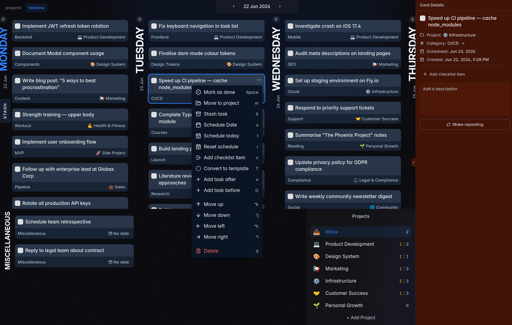
New version of Will Be Done is released! Will Be Done is offline-first, self-hosted task manager with visual weekly timeline.
The main idea is simple: collect tasks, put them on week timeline. I find that week timeline helps me stay more organised and fits naturally into my workflow. I can see what tasks done in which day, and what tasks planned previously in which day. Then, also, I missed other things, like open-source, offline-first, API, vim keybinds support.
It works offline-first, so tasks are stored locally in browser/desktop app(like Linear). You can open app and use it even when your server or homelab is down or no internet connection. When server is back, sync will sync changes between devices and server.
Main features right now:
- Offline-first task management. It will be still available and working if no internet connection
- Visual weekly planner
- Projects with columns
- Vim-style keyboard navigation
- Self-hosted server with SQLite as primary DB
- Fast sync between devices
- Recurring tasks
- Desktop app for macOS, Windows and Linux
- Mobile PWA
- Todoist and TickTick import
And here is what changed since my last post:
- Added task checklists.
- Added Stash feature. You can store tasks that don’t have exact date yet, but you still want to keep them in focus.
- Added task action menu.
- Added mobile card details page.
- Added IndexedDB support for faster and more reliable local persistence. New installs use IndexedDB by default. Existing users can turn it on in settings page.
Links:
- Demo: demo.will-be-done.app
- GitHub: github.com/will-be-done/will-be-done
- Download desktop app: github.com/will-be-done/will-be-done/releases
Self-host with Docker:
docker run -d \
  -p 3000:3000 \
  -v will_be_done_storage:/var/lib/will-be-done \
  --restart unless-stopped \
  ghcr.io/will-be-done/will-be-done:latest
Then open localhost:3000.
Would love to hear feedback!
AI disclosure
- Design - architecture, system design: no AI involved. I’ve been working on local-first apps for ~5y and have been a software engineer for ~10y. I even built HyperDB, a database for local-first apps, because existing solutions such as Dexie and RxDB didn’t meet my needs.
- Implementation - Pair. From the start of project it was Hint, but now it’s Pair.
- Testing - Generated.
- Documentation - Pair.
- Review - Pair. I have coderabbit AI + greptile, but also do manual review.
- Deployment - Pair.
threaded - newest
How does it resolve conflicts? How does it keep track of causality?
It is just LWW per column. On each client I track last change of each field with current time(actually sysytemTime-counter-clientId to make time uniq). Then, when changes arrive to server, I compare previous clock time with new clock time from client. If client win, it overwrite server column time + value. No tracking causality for now, just current system time of the client.
I would find it particularly interesting to explain how it works in the docs
I actually agree with you. I was avoiding making doc the whole time, but as amount of features growth, readme is not enough. I will introduce a good doc soon. Thanks!
lemmy.world/post/49151085
Fixed. Thanks for the hint!
Offline-first? The apps web page says Sign Up or Login…
You still need to sign up to sync between devices. With the self-hosted version, you also create an account, but authentication and all synced data stay on your own server.
Offline-first means the app works without an internet connection; it doesn’t necessarily mean that no account is required. After sign up/sign in, you can use it offline without any problems.
You shouldn’t have to defend this, it was clear.
Missed Opportunity: Git 'r Done
I hate to be that jerk, but did you consider just implementing this as a front end to TaksWarrior? It has everything here, with 20 years of experience, testing and community, except for the nice GUI/PWA front end.
Nah, it will very hard to do. I wanted it to be fast from the start, so I was playing with sync and how I store data in browser.
Or plain old CalDAV
Looking at the example screenshot, it just feels to me that there could be some proper dividers. it could be an old-screenshot and I’m just making a mistake, but it feels to me that there’s way too much shown to the user and it could be broken-up into child menus to be more compact.