from A9nWGzYt@lemmy.dbzer0.com to selfhosted@lemmy.world on 16 Aug 18:59
https://lemmy.dbzer0.com/post/74062078
I have noticed that my home server is strangely using lots of swap (~5 GB), despite having only a few lightweight processes running and loads of RAM installed (32 GB).
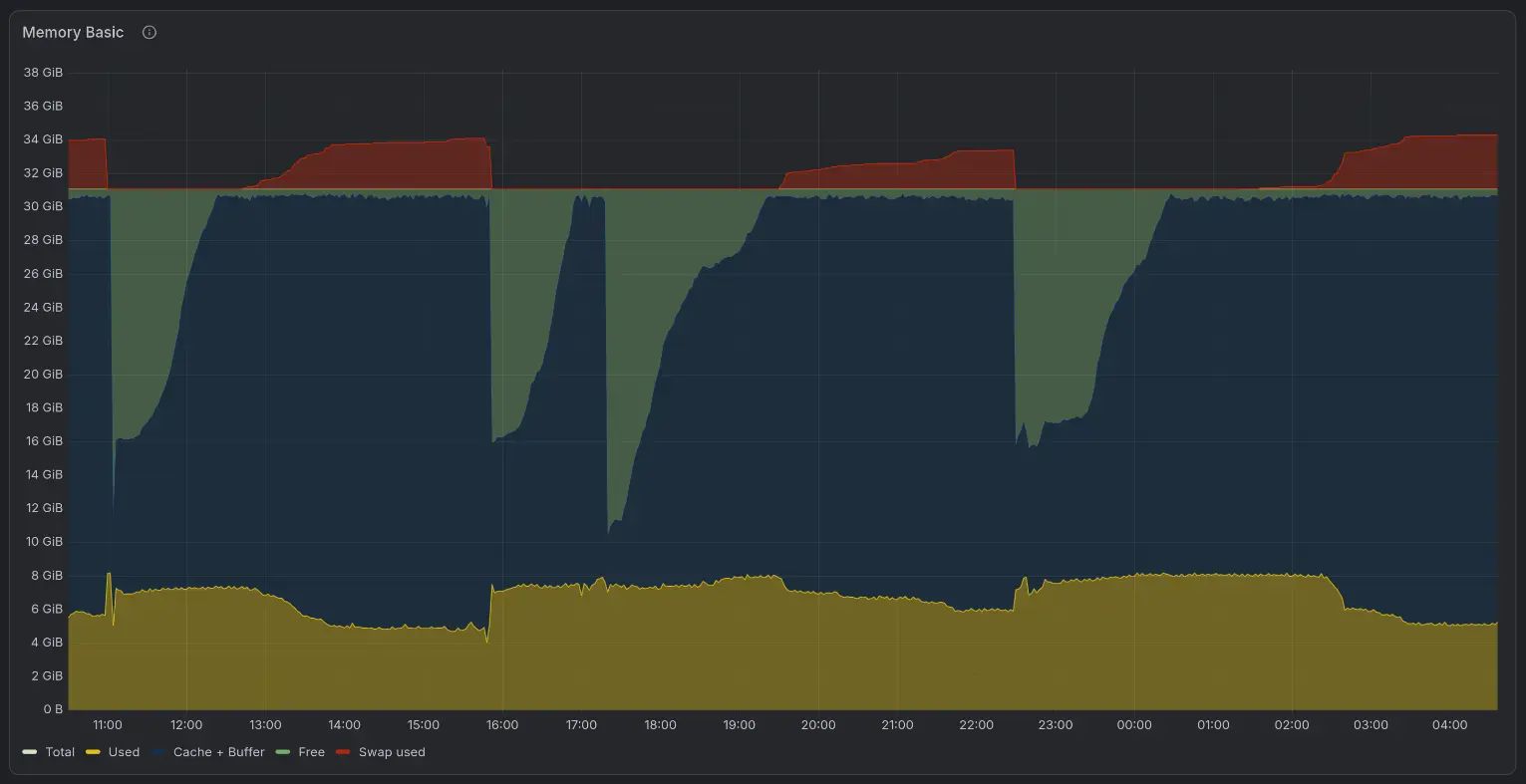
Upon configuring Grafana + Prometheus, I noticed a trend where cache + buffer will progressively increase until swap starts to be used. My system and services combined will use ~8 GB RAM. Upon rebooting, the cache + buffer will start anywhere from 3–10 GB, progressively ramp up to ~25 GB in 1–2h, where swap will start to be needed (~3 GB). See the image attached for reference.
My swap filesystem is on an expensive (to me) SSD, and I would like to reduce its wear by as much as possible. I understand that swap can introduce only minimal wear on SSDs depending on its nature and that it can be harmless, but I am still not sure what is causing this behavior (and why) and whether I should worry about it or not. So I figured I should investigate what is happening here.
My main question is, how can I figure out what is causing this behavior? Is it expected? I am looking for guidance from others who are more experienced than me in the topic.
A little bit about my system:
I am running Debian 12 on an NVMe SSD containing the root partition (btrfs) and docker services. I also have two HDDs, one with persistent data (ext4), and the other with backups (ext4). This is majoritarily a single-user machine. I tried using the following kernel parameters, but it hasn’t helped:
vm.swappiness=10
vm.vfs_cache_pressure=200
My docker services are:
- *arr stack
- jellyfin
- nextcloud
- immich
- open-webui + ollama
- pi-hole
- invidious
- romm
- nginx proxy manager
- grafana + prometheus
- other minor services that I don’t think are doing much (uptime-kuma, stirlingpdf, vaultwarden, etc)
threaded - newest
Yeah that’s completely normal, looks absolutely fine to me. For more info on how linux uses memory I suggest reading https://www.linuxatemyram.com/
To add: that link suggests looking if your swap usage is changing. Linux is quite happy to stuff some memory that isn’t actually used in swap. If it was right about it not being used you should see the swap usage not changing much, so your SSD isn’t really being used either apart from the initial swap-out. If your swap usage keeps fluctuating wildly there is more going on which might warrant further investigation.
The amount of swap used is not a good indicative, you need to check if there is a big exchange of data per second/minute. This is the only indicative of an out of memory system.
Sometimes, some regions of data memory “age” in ram without any access for a long periods of time, the the kernel here has two options, it could destroy the region knowing it could recreate it when needed (with some cpu overhead) or moved this to a swap file when the ram structure already in the swap file and release than section.
Which regions are good candidates for this? Buffers, specially in the fs, code region used for processes or even data sections of a long sleeping process…
Checking your data, if those 5gb are created over a long period of time I would not care a lot about it. Remeber how big the swap is, isn’t that important vs real traffic (in or out) to it
Huh…
Ubuntu 22.04.5 - 32 GB RAM - 53 total containers
That is expected and a good thing.
Free ram is wasted ram, so every file touched by any service will be cached and cache will stay there until ram is needed. This means that over time cache and buffers will always grow, because any subsequent access to those will be faster. The moment more ram is needed by programs, those buffers and cache will be freed immediately.
This is also the reason why some swap will be used even if there is free ram. Some stuff and pages can be swapped out without impact on performance.
Look at it this way: free ram is a wasted opportunity to increase performance by caching some file from disk.
You can enable zram and remove your on disk swap file if you prefer to spare the SSD write cycles…