Alright let's see pictures of your super nice rack-mounted, professionally installed labs. I'll start 🙃
from northernlights@lemmy.today to selfhosted@lemmy.world on 08 Apr 19:24
https://lemmy.today/post/50827717
from northernlights@lemmy.today to selfhosted@lemmy.world on 08 Apr 19:24
https://lemmy.today/post/50827717
Here’s my beautiful unemployed-for-too-long-have-no-money-dont-care-about-looks lab :)
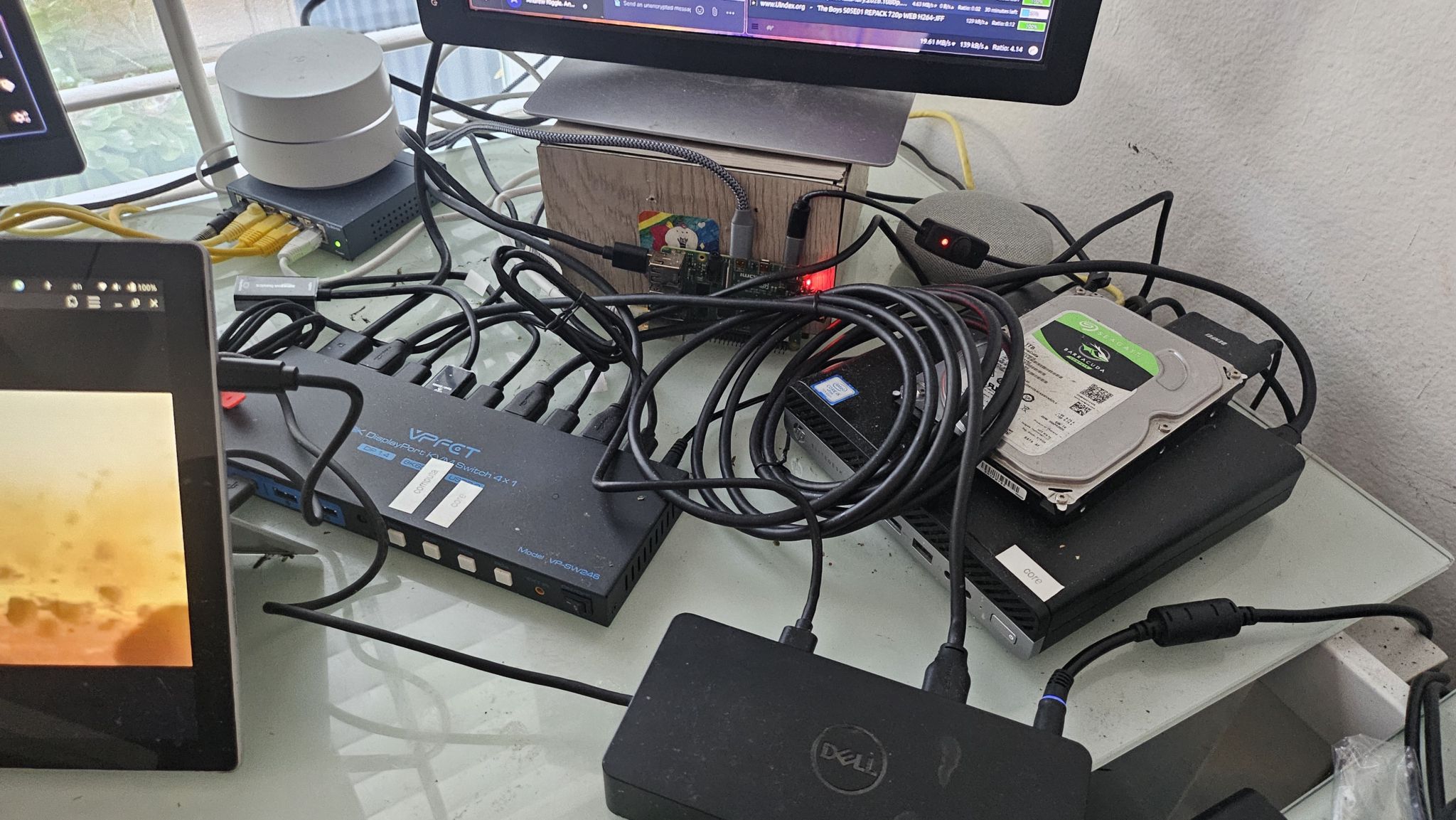
Hey it’s more than good enough to run all this ¯_(ツ)_/¯
threaded - newest
people put too much “lab” and not enough “home” in homelab. we need more dust, more cables, more jank. love this.
Believe it or not I cleaned before taking the pic lol
I had a dusty laptop running a homelab for you, and figured I should show something nice on the screen. Then, I typed in my password like an idiot. Not gonna put that online. :(
How dejected could you be when you can bring someone such joy?
That man is a menace.
That desk is about a million times cleaner than mine.
This is the best thread so far. Really enjoying seeing peoples setups! Thanks @northernlights@lemmy.today !
Dust and jank you say? Behold, my old basement homelab when I rented just outside Boston with a very permissive landlord who agreed to let me have Comcast gig pro fiber pulled into the basement, running off an outlet I installed without asking on a free slot in our breaker box. The dust was terrible, the rack was a hodge podge, I had to put up that sign because maintenance guys kept plugging their power tools into the UPS when I wasn’t around and tripping it. But Comcast fucked up the billing and the 2gig + 1gig symmetric internet is still active to this day for free, which I left behind minimally working for the next tenants after parting out the rack. The tower by the side was a friend who wanted to colocate on my fiber, and I had some fun stuff like a slide out vga console. I also pulled Ethernet into every room, most of them installed with nice wall plates all bundled down to the rack, so with a house full of gamers, you could have multiple people pulling a gig on a game download without anyone stepping on anyone else’s toes.
<img alt="" src="https://lemmy.ml/api/v3/image_proxy?url=https%3A%2F%2Fi.imgur.com%2FRSHdCAE.jpeg">
Dang that’s the dream. Never move out :D
Very nice. You guys with all the toys. I bet she’s fun tho.
When did people start using the term ‘lab’ for this sort of thing, and why?
I think because it lets them see themselves as scientists or so
.
This guy home labs 😂
the hardrive just out in the wild, living life like it was meant to be lived.
What are its natural predators?
gravity
beverages
drunk sysadmins
Spill your beer on it and get all three in one go!
Cats and very young humans
Keys, paperclips and coins… they kinda work their way towards the PCB and short out crtitical things
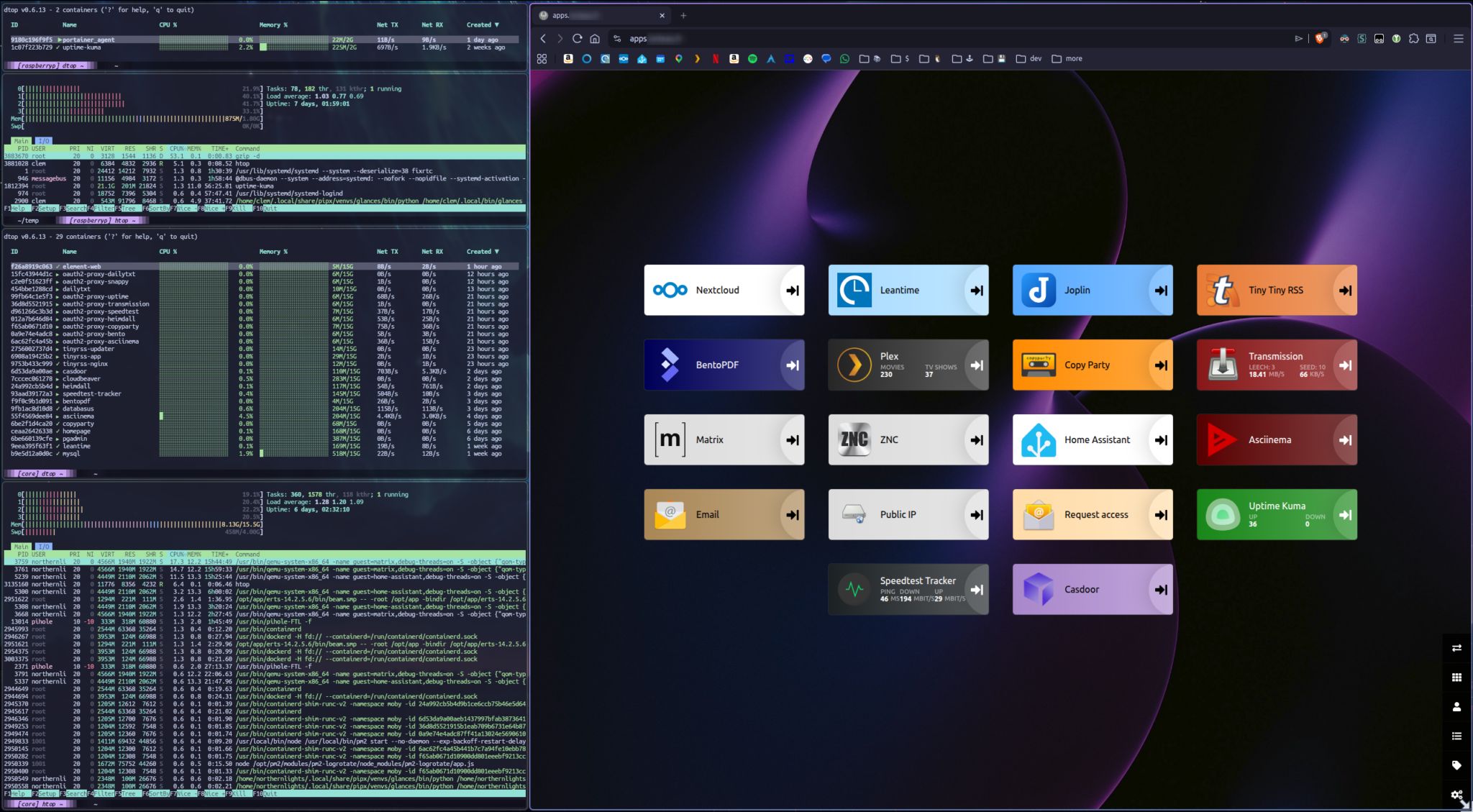
Hey you know what, screw it, see for yourself how it performs: apps.lorteau.fr
BTW I’m really liking asciinema, I think it’s a great idea.
Example: <img alt="asciicast" src="https://lemmy.today/api/v3/image_proxy?url=https%3A%2F%2Fasciinema.southernlights.fr%2Fa%2F11.svg">
Edit: OMG it’s so annoying how lemmy just rewrites img links - …southernlights.fr/…/2026-04-08_19-04-1775678390.…
What’s that web interface thing? Is it home made? I keep thinking about doing something like that to save me having to remember port numbers for the different services on my home server.
It’s just heimdall, behind haproxy (on the raspberrypi) so everything is on the same domain (and behind cloudflare because i’m a madman who exposes stuff publically)
Port numbers??
Have you tried assigning names to services and routing them through a reverse proxy that maps the name to ports?
e.g. sonarr.local.lan > nginx > server.local.lan:8080
Those HP Elitedesks are all over Amazon as refurbished machines. I was actually considering getting one earlier today for a server.
Love 'em. Medical offices around me are selling them like hotcakes, fed up of Win11’s promises of being capable of delivering a light terminal.
Heh. Someone else in this thread posted an image that has three disconnected Elitedesks just stacked on each other on the bookshelf housing their homelab, another powered-on one, and what I think might be two or three more Elitedesks that are partially-obscured.
Hard-drives deserve to be free to their cases! Free the drives!
Classic blue 5-port gigabit switch. Chef’s kiss!
These things will be with us until the heat death of the universe. Still chugging along.
Right? Took it from a job I left 10 years ago.
Ha! Mine’s the same! My job was dumping them and said take it if you want it. A v1 TP-Link TL-SG105. I don’t think I’ve used mine in at least 10 years but I can’t bear to throw it away.
You want a double-backslash in Markdown.
yields
¯_(ツ)_/¯
Whereas:
yields
¯\(ツ)/¯
Indeed, I really should have caught that.
You need to add backslashes to your underscores since Markdown is turning them into italics.
yields
¯\_(ツ)_/¯
Thanks!
Projects that im running:
General Web server out of junk
Old system 76 machine from a while back. Its what is running a majority of my services for self hosting. Only one screw keeps the case together, since I get into the insides quite often. <img alt="image" src="https://media.piefed.social/posts/zr/w5/zrw5ZSiBiGoijRQ.png">
Solar powered web server on a phone
Solar powered web server. Its going to be repurposed into a meshtastic node soon.
<img alt="Qm4kpb3x0dQ7Qib.jpg" src="https://media.piefed.social/posts/Qm/4k/Qm4kpb3x0dQ7Qib.jpg">
<img alt="hRMBBvZMfVgbgIs.jpg" src="https://media.piefed.social/posts/hR/MB/hRMBBvZMfVgbgIs.jpg">
Ebook reader on a heltek v3
Somewhat jank setup of a heltek which is also an ebook reader. It runs a webserver to upload the book in txt format, then I can take it on the go. I still have to do some work on the text. <img alt="J6SwY2qZLUHcGkY.jpg" src="https://media.piefed.social/posts/J6/Sw/J6SwY2qZLUHcGkY.jpg">
Now that’s a crafty homelab, love it
The best homelab is the one you already have.
The second best is the one you want to buy :D
Is that a PI in your setup?
Yeah it’s just haproxy + uptime kuma
nice!
That ebook reader is wild! Does the text stay in place while you read, or does it scroll past like a stock ticker?
If the latter doesn’t exist, I guess I should go push a PR to make that happen on meshcore firmware haha
Stays in place. It was a weekend project so I still need to do some work on the text in particular. Im not sure if ill go any farther, but the code is here if you want to take a look.
If you get bored and adventurous:
en.wikipedia.org/wiki/Computer_case_screws
You might be able to get a box of thumbscrews in the appropriate diameter and go toolless. I’ve had a number of computer cases that ship with those (my current desktop case just uses magnets, doesn’t even have the thumbscrews). I have had a lot of less-than-ideal toolless things in the past, including poorly-designed toolless hard drive mounting stuff that wound up being a lot more work than the traditional tool-requiring stuff, but for the screws that keep the case closed, going toolless has always been a big win for me.
Thats good to know! Although if I am honest, ill probably just repurpose my current desktop that I am using for this conversation and get a new one if I end up re-doing my homeservers again.
Last thing I want to do is more work at home. So these are just “for fun” projects. If im not having fun, I start removing things from the setup.
You need to make a ‘I’ve been busy’ post.
The home server under my desk. Very professional, as you can see.
<img alt="" src="https://lemmy.trippy.pizza/pictrs/image/b7a53d87-e5be-4df0-9b17-0d0836e39c7d.jpeg">
Oooh that’s neat.
Buco seems to be having a good time. 9/10, unsure how Eaton feels.
The Eaton unit is a UPS that’s connected to the whole setup. It works really well, I can recommend it.
Okay I’ll bite.
<img alt="" src="https://media.fedinsfw.app/file/fedinsfw/posts/Rp/ft/RpftU6HbzopjrGv.jpg">
Dang so very jealous. When I finally get a job i’m so building a little datacenter in my walk-in closet :D
Re: the cabling up top there, there’s some Reddit subreddit devoted solely to people showing off their spiffy cable-routing.
searches
Might be:
old.reddit.com/r/CableManagement/top/?sort=top&t=…
Though that looks like in-PC-case cabling. I thought that it dealt more with network cables.
searches more
Ah. I think this:
old.reddit.com/r/cableporn/top/?sort=top&t=all
It looks like we do have a !cableporn@lemmy.world, but basically nobody is posting.
hell yeah.
Oh man, your server has its own closet!
<img alt="PbZGpWD7AVUk3ya.png" src="https://media.piefed.ca/posts/Pb/ZG/PbZGpWD7AVUk3ya.png">
More specs / details available upon request.
This looks solid!
(OT) what did you use to annotate the picture?
https://apps.apple.com/us/app/skitch-snap-mark-up-share/id425955336
Did someone ask for jank, dust, and cables?
<img alt="" src="https://lemmy.dbzer0.com/pictrs/image/10cbd072-65bc-4e2b-a1f4-3370703c3eb4.webp">
Hey, shock-absorbing floor, stable structure to put the servers on, and a UPS. I bet that’s much better than the vast majority of us (1st thing I buy when I get a job is a UPS).
This looks like an after-work special. Nice setup. That APC is awesome. I need to get a new one.
I have that ups! apc br1500g?
I’m too lazy to take pictures, but I have a synology sitting in an Ikea Kalix and an older laptop mounted to the other side of the wall (that the kalix is against), which is a bathroom in my garage.
We had contractors working last summer and let them use the garage bathroom. After the 3rd day I overheard a few of them developing conspiracy theories for why we have a closed laptop mounted to the wall and with fans that would occasionally cycle up.
Haha i have a raspberrypizero screwed to a wall in the garage that turns my regular doorbell into a smart doorbell through a relay I plugged into the GPIO, plugged into a numpad to arm/disarm cameras, and into a little camera that takes a picture when a wrong code is entered, ran by a little python script I wrote. I’ve heard very similar comments lol.
<img alt="" src="https://lemmy.world/pictrs/image/461a367e-eb00-44bb-80cd-114c4dc3fb29.jpeg">
So clean, I’m jealous
I remember looking at Sysracks racks a while back when I was trying to find sound-absorbent enclosed racks (which they do make, though I didn’t get one; wasn’t willing to pay for it, as they come at a very large premium). They were one of the very few companies making them. I don’t think that those particular ones are the sound-absorbent models, but their name stuck in my head.
I got this because it’s almost fully enclosed. Most of the noise comes from an open rear door which this doesn’t have, and an open front door which this sort of has. It’s not very loud when the hvac is set to a reasonable level, even though it’s pulling air through 4 fans on the top.
I have additional sound deadening material if I need to apply it but I’m not there yet.
I’m eyeing 3-5 more 1U servers though so maybe I’ll need to do it.
That’s probably a pretty good idea in terms of cost. I checked earlier when I made the comment to see what the price difference these days was, and IIRC a non-isolated 18U is ~$800 and an isolated 18U is ~$1800. They aren’t putting anything like $1k of sound-absorbing material into the rack.
Oi thats too clean for this thread. Get out of here! /s Nice setup.
Business in front…
Is this the “before” shot? There’s 190 spare ports. I’m all for leaving room to expand, but that’s a lot
Unpowered free 48 port switches are cheaper than block off plates.
Can’t argue with that!
How can you hear the DJ tunes over the server fans?
Can’t hear either over my tinnitus
Same. Thirty years later and I still have it D:
Man, GTFO with that hot mess… I’m jealous really. I’m getting a chub just thinking about it.
<img alt="" src="https://lemmy.world/pictrs/image/7cfb6504-6bfc-4c9b-a6b3-d052868c0d65.jpeg">
Nothing fancy myself as well. Not unemployed but I don’t necessarily wanna spend a lot on something I’m really just cutting my teeth with so far.
The central hub is up top, a Bosgame P4 Mini with 16GB DDR4, 512GB NVMe and a decent last-last gen Ryzen 7. It’s enough to run Jellyfin, HA, and PiHole all through Proxmox. Been rock solid outside of a planned power outage Peco was doing (and actually did it this time!)
I also have Jellyfin connected to an 8TB RAID1 NAS that resides upstairs in our shared space, and HA connected to the basement tech, mostly lighting and the TV and PC.
Bonus battlestation pic (not really lol)
<img alt="" src="https://lemmy.world/pictrs/image/aa8f0217-8415-4c8e-ad90-6a6caa85f4fd.jpeg">
nice
Hey this looks how my setup would look like if I had the energy to clean :) lemmy.today/post/39171225
I spent too much time trying to get a configuration in which I could fit both the MiniPC and Router/Modem in the cabinet. This fixture came with the house, so I’m not complaining. I think I should swap out the surge protector (not even sure if it is one lol) for something more streamlined. And as for the mounted switch? That’s $2 velcro strips at Walmart :P
booooo! /s looks awesome bro. It’s too clean tho.
Yeah I think I have a before picture on here somewhere. It was less messy, but I’m not quite ready for a rackmount or other system. I’m not even sure I need to jump to that level lol. Unless you’re talking about the 2nd pic, oh it can get messy. I cleaned up a bit so it wasn’t too gnarly. Shoulda changed my background too, I usually go for greenery or abstracts.
I was too lazy to put on clothes and go out to my shack. This picture is a bit old. It’s missing a lot of mess and my PeerTube server. <img alt="" src="https://lemmy.wtf/pictrs/image/99763e45-2ed6-4896-9caa-2e4ae9d573f4.png">
Is the UPS between quotes just a fancy power hub? I mean that would work, that’s smart.
Yea, it’s a power station with built-in UPS. iallpowers.eu/…/allpowers-r600-portable-power-sta…
The white box at the wall is also a battery from my solar setup, with an ATS. So kinda double UPS 🤭
I want one! Ive been thinking of setting up one with solar since my area gets next to no rain and hot as hell. Might as well use that to my advantage!
I’m still not using one. The problem is that you’ve got two classes of devices that haven’t quite converged to what I want.
UPS
Traditionally, the purpose of UPSes isn’t to keep systems running (other than through very short outages). It’s to do one of the following:
Provide a small amount of buffer until a backup power system, like a generator, has time to come online.
Give the systems time to shut down cleanly. If the user is right there, they have time to save their work. This was particularly an issue before journaled filesystems became the norm, since an unclean shutdown in the era when Windows was using FAT, Linux was using ext2, and MacOS was using HFS had at least the possibility to corrupt your filesystem. They have the ability to report their charge level to an attached computer so that it knows when the battery level is critical and then software on it can start it shutting down. On Linux, the most-common software package to do this is Network UPS Tools, or NUT.
These things don’t need a lot of capacity. They rarely get drained, so they usually use lead-acid batteries, which are heavy and don’t have many full charge-discharge cycles in them (but are pretty happy staying fully charged all the time). You can still get these. The lead-acid batteries are replaceable, though, so an old UPS can keep going for a very long time.
Powerstation
These are designed to keep attached devices running for a longer period of time. Unfortunately, they have a couple of important limitations for powering computer systems.
They do not normally have the ability to report their charge level. Irritatingly, they do nearly always have a voltmeter rigged up to some software to map voltage to charge remaining to drive a ‘charge remaining’ display on the device, and there are USB HID device classes for reporting charge levels to a host OS, but for some reason, powerstation manufacturers don’t seem to have an interest in making a powerstation that has the latter functionality. NUT does have a USB HID backend, which means that it can monitor and shut down a system if they’d expose it. I’d really prefer the ability to treat one of these as a laptop-style battery, as Linux (as well as other OSes) have the ability to hibernate on low battery. On Linux, these show up as
/sys/class/power_supply/BAT*, and there’s lots of software to display charge information and act based on low levels…but AFAICT from looking around the kernel, there is no way to get the kernel to deal with a USB HID device reporting remaining charge like this as a BAT device.Computer power supplies can only smooth out so much of an interruption in their power. Computers rely on something on the order of a 10 millisecond transfer time after AC goes out until the UPS needs to be running full-tilt. searches ATX PSUs apparently are only required to operate for 16 milliseconds without power. Other hardware attached may or may not actually deal well with interruptions, but obviously the shorter the transfer time, the better. It looks like line-interactive UPSes tend to do something like 3-6 milliseconds. The problem is that a lot of powerstations have a transfer time in excess of this.
There are some LFP UPSes now, but these have their own disadvantages. They tend to be fairly pricey, and the batteries are often not replaceable, which means that unlike the old lead-acid UPSes, when the battery dies (which will take longer than with a lead-acid battery), the whole device is also going to the landfill.
And lastly, you have the problem that while lead-acid batteries are pretty mature and prices are pretty stable, LFP battery prices are coming down (and sodium-ion might start competing with them for fixed batteries). If batteries are cheaper in the future, waiting means a better deal.
I don’t currently run a UPS on my systems (though I have in the past). I kind of decided that if I’m going to run a UPS, I’m probably going to just bite the bullet and use the combination of a traditional lead-acid UPS and an LFP powerstation, with the UPS plugged into the powerstation. In that configuration, the powerstation provides provides the longer-running power, and the UPS deals with short transfer time and warning computer systems that power is about to go out. This isn’t perfect, because (a) your computing devices can’t see the remaining charge on the powerstation in an outage (b) at some point, one still has to toss the LFP powerstation, and (c) there’s a little extra hardware involved. However, it also has a number of benefits:
Lead-aci
Lol puts “UPS” in brackets to suggest something janky, reveals it’s a battery power + solar power backup. Kudos :)
so, that’s where lemmy.wtf lives
Wtf?
en.wikipedia.org/wiki/.wtf
Oh neat! is that where peertube.wtf is also hosted?
That’s the server currently missing from the picture. Right now it’s a mess, because I’m doing a re-setup of everything. But getting my hands on hard drives have been difficult and I actually still need a CPU and motherboard.
I feel you. HD space (and everything else) is sooo expensive. I have an old spinning drive for my peertube instance just cause is easy to source.
Solid cable management 🤌🏻
It is strange seeing the physical manifestation of a web endpoint, to me, in 2026, after decades of cloudslop.
Its just a computer! on a shelf! you can go hold it!
This. Is. Beautiful.
I want one!
Acronyms, initialisms, abbreviations, contractions, and other phrases which expand to something larger, that I’ve seen in this thread:
17 acronyms in this thread; the most compressed thread commented on today has 15 acronyms.
[Thread #223 for this comm, first seen 8th Apr 2026, 20:50] [FAQ] [Full list] [Contact] [Source code]
DNS is never the Domain Name Service.
The very first sentence of RFC 1034, the document that is the basis of DNS, identifies it as the Domain Name System.
Dust and jank, you say?
<img alt="" src="https://lemmy.dbzer0.com/pictrs/image/1530cfe9-930d-4665-ba0b-1682bfb19c38.webp">
Takes no space anybody cares about so it works in my book
My wife did say she didn’t like seeing all the stuff just out like that. I reminded her it was a small compromise compared to spending over $100/mo on streaming services.
Also, buying or building something to cover the less is cheap, and possibly fun, mini-project. As long as you allow a bit of airflow…
Is that usb mounted??
<img alt="" src="https://lemmy.dbzer0.com/pictrs/image/42ec1446-754a-480e-acdb-086d9a66ad5b.webp">
My little Raspberry Pi 5 with an old 1tb Hard drive connected to a WiFi extender. It ain’t much but I like it.
I used to work in automation as an electrician so I’m all about those coils and curves.
Hey it works doesn’t it :)
Coils & curves?
From my viewpoint it looks like balance and counter balance 🙂
Are those all balanced, pivoting around a power outlet?
It’s actually a plug in power outlet that plugs into a dual outlet box. It’s a snug fit so it’s able to hold all the extra weight surprisingly well.
It’s hard to see but I made a hook with the cable wrap holding the Pi5 and it hooks onto the cable wrap that goes the top of the quad outlet. That top cable wrap won’t slide down because I have two USB cables holding it in position. I designed it so I can easily detach it in case I need to do anything with the Pi5 or it’s hard drive.
I tried really hard to balance the Pi5 but the grey ethernet cable has too much weight so that’s the best I could do. I think I did a pretty good job all things considered :)
Gorgeous 😍
<img alt="" src="https://media.piefed.social/posts/ZA/Ya/ZAYacYs6BHnNCQh.jpg"> Not as clean as I would like, but way better than it started!
5 node Kubernetes cluster and a NAS. Runs about 250 pods.
It’s cleaner than 50% of what I’ve seen at work.
Question… I often see rack mounted servers with those small Ethernet patch cables running between two adjacent devices, like you have there. I’ve always assumed one of the devices is a switch, but it’s never made sense to me why there’s so many connections between those two.
What are those devices, and why so many connections between them? Like, as far as I can tell, in one instance you have a cable running from the top device to a small switch resting on top, which then runs from the switch to the lower device… Despite all of the other Ethernet running directly from the top to the bottom. What is going on here??
.
Yeah, one is a switch. The patch panel basically is just for organization. All the equipment in the rack and all the house runs all plug into the back of the patch panel and then the short cables allow you to more easily plug them into the switch. Its definitely not necessary, but it helps maintain the space.
And that one random device on top is the router. Maybe one day I’ll upgrade to a better one, but this one handles everything great. Its just too small to be worth mounting. Kinda like the Pi sitting on the UPS.
I also didn’t know, thanks to eodur’s answer I could find this video m.youtube.com/watch?v=lg2oGE02DJE
What do you use for your Kubernetes build?
Also, do you have an S3 compatible storage? If not, what do you use for persistence?
I use k3s, but I’ve been considering a rebuild with Talos.
I used Minio for years but I’m currently migrating to Garage on both my NAS and my cluster. The garage operator is pretty solid.
The server is the black box on top of the rack. In the rack it’s networking and UPSs for both the server and my computer on the desk.
<img alt="" src="https://piefed-media.feddit.online/posts/A6/RL/A6RLNiEVX9x2qV3.jpg"> <img alt="" src="https://piefed-media.feddit.online/posts/Eg/d1/Egd1mC8S1JvIxr5.jpg">
This is neat, doesn’t take too much place so fits in a classic house situation.
I think we have the same UPS
it’s a mini pc, standing sideways, with a USB to ethernet adapter and USB HDD
<img alt="" src="https://retrolemmy.com/pictrs/image/c3172837-6c5a-481a-b63a-416d5571829d.png">
My janky homelab lol. Mostly ebay secondhand Enterprise stuff and a Chinese SXM2 mezzanine board to run dual NVLinked 16gb V100s. I also have a TrueNAS Scale mini itx server running upstairs with my “arr” stack and some other useful tools.
<img alt="2076" src="https://lemmy.world/pictrs/image/97e5a204-3f63-4c54-bfba-49511f965984.jpeg">
<img alt="2392" src="https://lemmy.world/pictrs/image/ad228874-43a9-4918-8dc5-af4eaee14706.jpeg">
I’ve wanted to make frames like that but those aluminum extrusions are so expensive here. I’m tempted to just get stainless square tube and weld it. The welder would appreciate getting dusted off and receiving the attention.
I thankfully snagged this one pretty cheap off eBay. It’s actually an 8-gpu mining rig frame that conveniently fit my CEB motherboard lol
Now that looks like a lab :)
Thank you 🥹 It’s been quite the experience lol
I think your servers are missing some walls.
I jest.
You can bolt whatever you want on those. My friend made his gaming rig like that and the sides are cardboard from his grandparent’s adult diaper boxes.
“the front fell off?!”
They’ve been temporarily removed for about a year now lol
OK you’ll be able to tell I haven’t bought a graphics card in a while, so…wtf kind of graphics card is that? It’s manly for sure…almost phallic in nature. What do you do with it besides ‘Any ting you wan’.
looks like an older nvidia workstation card. potentially a tesla k80 of the top of my head? the annoying thing with those cards is that they’re meant to be passively cooled in a temperature controlled environment, so looks like they added a fan to help keep it cool. those cards get mad hot otherwise.
I’m actually quite happy with it. It’s a 24gb p40 which runs some of the older LLMs quite well. Repasting with liquid metal helped thermals a ton too
It’s a Tesla P40 24gb I got off eBay a while ago. Just like AllHailTheSheep suggested, it’s a server GPU meant for compute workflows so it relies on forced air from a server rack. I repasted the die with liquid metal and added a 3d printed duct to attach the radial blower to. The thing never cracks 60c under inference which is nice. Idles around 24c
(Edit: I’m mostly using it for LLMs, but it supposedly makes a good CAD card, so I might give that a shot too)
Nice!! I love seeing ‘field expedient modifications.’ I have an old CoolerMaster Cosmos case. The thing is a monster. I didn’t like the way the fan cooling was operating so I took two 4"/300 cfm fans and mounted them to blow over the two processors of my mobo. Then I printed a scoop for the case and used that as the intake. Works well, better than the OEM configuration and keeps my processors running at a cool 98 deg +/-.
<img alt="1000028194" src="https://sh.itjust.works/pictrs/image/1c3e9fb2-f05f-4749-9401-b63061c62e01.jpeg">
Including sbcs there are 8 computers in there. There are 5 more laptops and another retired desktop joining. There are plans to get solar and batteries so I’m checking how much power I can actually draw.
edit: just found the weird netbook with usb3 ethernet that I used to run homeassistant bare metal back in the day. one more for the computer pile.
Is that an EliteDesk 800 G3, G4, or G5?
800G3 it is. Not that it matters much, it’s more than a few users on a semi busy homelab need.
I only ask because I work in a HP environment and run off a G3 sff myself.
What are the two circular grey devices on top of the five port switch?
It’s one device that’s a Google WIFI mesh AP
<img alt="" src="https://lemmy.dbzer0.com/pictrs/image/c255fba3-4964-4278-b150-a540f7d482ac.webp">
Only two of the minis are in use. The other two i am just messing with different things. Still have three more not in use and unsure what I am going to do with them. Two extreme AP not being used and probably never will.
The outdated books are a nice touch 🤌 :)
Oh also since you literally have more hp elite desks than you can use, please send me one :)
What kinda monitor arm is that? I have one for a lil monitor I have but it uses a clamp on the top and bottom of the screen instead of screwing in. I’m looking for one that doesn’t stress the screen with so much pressure!
I honestly don’t remember but I got it at Walmart for like $20 for a double monitor. The monitor is have is 27" and never had any issues with it.
Thank you! I’ll do some digging. The dang thing has mounting holes but they’re NOT VESA. But 40USD for an IPS 1080p panel that can be powered AND video’d through one USB-C cable I can’t complain about!
3 more not in use you say? Willing to part with any of your unused tech?
.
A little late to the party, but here’s mine.<img alt="" src="https://media.piefed.social/posts/L7/9h/L79hMuGayatrM0g.jpeg">
What are the specs on that pepsi box? How’s it handle the load???
It’s only the mini Pepsi cans iirc, so they aren’t as load bearing as I’d like. God willing, I’ll upgrade to fanta boxes one day.
Love it.
Oh yeah, now that’s a HOMElab
.
<img alt="" src="https://lemmy.ml/pictrs/image/d31f3f54-8ab5-4fea-b890-08bd444f3d8e.jpeg">
Also late, but here is mine.
From the bottom up:
And here’s what’s running:
That’s actually pretty neat!
Neat, very nice! I just got some new machines, I need to learn how to get one of my VPNs set up with gluetun and qbittorrent so I can stop doing on my windows machine and leave it going all the time…
Thanks!!
I found it to be pretty easy to get gluetun & qbittorrent set up. I’m running it all in docker, be happy to share my compose files if you’d like.
That would be very helpful for me, thank you so much! I am VERY new to docker, but managed to get something difficult up and running with it (a modded game server) with a lotttt of trial and error. I imagine it’ll be a lot easier to get something much less specific going!
You’re welcome! I’m out rn, I’ll share the files when I get home.
No worries, no rush! It’s gonna be a weekend project, I think. I’ve got a cluster of separate RPis all doing different stuff, an unused Pi 5 8GB, and some new Lenovos… I think I can condense everything to one machine hahaha.
Right now I’m running Pi-Hole on a headless Pi and OMV on a second headless Pi, the OMV is just sharing a couple HDDs. If I wanted everything on one lil Lenovo through Docker, would you have any advice for a distro? Should I just pop Mint on it and set it all up that way?
(Very new and learning, currently have a Pop! desktop that’s been a champion for game stuff while I try to find a new SSD to switch my main game desktops to Linux)
This is a great thread. I had to join too!
I have my “network closet” which is like a hole in the wall where my ISP comes in: <img alt="" src="https://lemmy.dbzer0.com/pictrs/image/14a56db8-329c-4868-a84e-5c2effb9dc99.webp">
And then my “server room” which is literally a closet. There’s a big ass old enterprise server and a 3 node laptop cluster: <img alt="" src="https://lemmy.dbzer0.com/pictrs/image/1433a12e-6159-41b3-997a-8e9651955c3a.webp">
Using the closet rod for that extra cable management
Perfection.
Eh, you know at work there’s one closet like that per floor :)
<img alt="" src="https://lemmy.zip/pictrs/image/a81b8406-cccc-48ac-807f-e591dc273035.avif">
.
HAHA that works :)
<img alt="" src="https://lemmy.dbzer0.com/pictrs/image/d6840bbb-b39c-492c-a988-4a4864abaa91.webp">
Kinda in a lull with homelabbing ATM, but here I’ve got my router in a custom 3d printed mini rack with 3d printed patch panel, and a couple of old NUCs. Only thing I really use day-to-day is a NUC connected to an amp so I can use the amp as a Spotify connect client
Oh now that is clean. Works really well with the overall display of vinyls.
<img alt="" src="https://ani.social/pictrs/image/c3f0e177-9fb7-4ab9-883c-54bc34711cf8.webp">
Here is my combination lab and workbench. I have been busy trying to buy/sell/trade computers that I have become significantly behind on cleaning as I go. I also just got the network rack:
<img alt="" src="https://ani.social/pictrs/image/f87a3d01-0da7-48a7-a9db-0e6d92047b14.webp">
I haven’t had time between work, hustling, and home maintenance to finish getting the cabling managed or the NAS:
<img alt="" src="https://ani.social/pictrs/image/aa4c4388-a096-4d53-9275-2b212aeb0fb5.webp">
The goal is to get the NAS in the rack, UPS to the items in the rack, the 3D printer under the bench, and the monitors on the wall and off the bench. Then I’ll start in on plastic organizers for the bits and parts that clutter my bench.
Oooh I like :D Kernel panic?!! BAM! BAM! BAM! in the punching bag!
Stupid BAM Broadcom BAM Legacy BAM Wireless BAM Drivers BAM
Just cleaned mine up a bit recently!
<img alt="simple home lab setup" src="https://lemmy.ca/pictrs/image/2ed0c4df-68ad-4934-bed1-3a656916c21c.jpeg">
PC on the left, RPi for simple stuff and an Odroid HC4 as my media and backup server.
Not pictured: another RPi dedicated to HomeAssistant, a magic mirror, and networking stuff.
Also not pictured: my workbench tools on the upper shelves, which have not been tidied recently.
It looks much better than I have. My current infrastructure is built upon a set of mostly obsolete devices: Intel Atom 230 and 330 used processors. Also, SBCs: a few Raspberry Pi 2Bs, and a few Orange Pi Zeros (the very first gen, 32-bit). They are spread among different locations (office, relatives, home), and if I’d get a side gig job with the next company, I may deploy a couple of used computers for them too. So there’s not much to picture, but it looks much worse than this.
Also, is it a Surface on the left? I almost sure it is! I’ve bought 3RT (obsolete slow model) two weeks ago. It’s piece of shit hardware, but the concept of a Linux tablet / laptop for cheap (I buy used) is beautiful, so I’m considering getting one more modern model at some later point. I guess when my battery would be in a poor condition. It’s a great device for sshing, at the very least.
That’s the spirit, re-using “obsolete” stuff that is so not obsolete. And yes, good eye, it’s a Surface Pro 7 on Ubuntu on the left ;)
.
As for Linux on Apple computers of that time, if i’m not mistaken, they’re i386? So probably someone hacked that together. As to needing a system that works for blind people, I have no experience in that area, but if the tools you need are available on Linux, then they are.
Hey, I have no experience with the accessibility side of this, so I cannot tell. At least now. If I’d explore the topic, I might recommend something at some later point.
I have a MacBook Air 11” from 2010, with a broken screen. I plan to utilise it as a server, but it’s not really good in that department. I do that purely because of the experiment, plus I have it lying around anyway, so why not. If you want, I can link a blog post about the laptop, when I’d write it. (May not be very soon, say, weeks. If no months. No ETA. I played with it for a while and put it off for later.)
The time capsule, is it a router? I have an AirPort Extreme router at home, I still use it. It’s a decent router, if you don’t need anything too special. I have no idea how good that is accessibility wise. I believe Apple products are the best at it, so I’d rather recommend macOS, I have no idea how bad that is with Linux. I remember the relatively recent series of posts about it, I bet you know them better.
Hey, how’s your Surface with Linux? I wonder whether there is any model that can sleep properly without issues. So that you can have it lying around and pick it up when needed. Mine cannot sleep properly. So I turn it off and on when needed. Not super useful, but tolerable for a secondary device you can have in your backpack, not worrying much about it. (Coz it’s cheap on a second hand market, specifically my very model.)
I like your screenshot, what distro and DE is that?
Arch, not a DE, just hyprland.
<img alt="" src="https://lemmy.world/pictrs/image/53cd580f-c8ae-4c58-84c2-b1aad52bd23c.jpeg">
The white leds are a nice touch :p (i’m totally not jelly)
<img alt="" src="https://sh.itjust.works/pictrs/image/4fa46048-dba0-4172-9dc9-a42e07870eea.jpeg">
Not too noisy? I’m curious.
Not at all! I upgraded the heavy lifters case fans to all noctuas, there’s still fan noise but it’s very easily drowned out. Actually the most noise came from my HAL model. Partly sunny days would trigger its sensor and it’d randomly start spewing lines.
I read “Alright let’s see pictures of your super nice rack”
And then I clicked before bothering to read the rest of the sentence.
Was not disappointed though.
Built a year ago, didn’t change anything but drives since. PCengine APU OpnSense, two Proxmox cluster hosts, one mini PC NAS with JBOD. All DIY.
<img alt="" src="https://lemmy.nocturnal.garden/pictrs/image/3bff4bbc-e904-448d-84b0-8c2b027bcbbc.jpeg">
<img alt="" src="https://lemmy.nocturnal.garden/pictrs/image/4c9d0f6d-531b-4143-950d-b41c9ff805b6.jpeg">
Way too professional looking for this thread.
Also, you got a link to that sticker? Maybe I’ll add that as an ironic reminder to my “Kabelsalat” 😅
I think I missed the irony 🙈
It’s from Kaoskvlt
I’ve seen that one before!
Yeah I posted it when I built it :)
mine is 3 old laptops and a switch in a pile
honestly the cable management is ok … ish
Such professional. Much clean.
<img alt="" src="https://lemmy.world/pictrs/image/2174219a-75a4-44b3-b881-38511f3bea5f.jpeg">
Not pictured: my raspberry running adguard. It’s tucked behind a TV, because it also runs Kodi.
Also not pictured, my Sophos SG-135 rev 2 running OPNsense. It’s in the box where my Starlink equipment is, on the other side of this room.
That 95% unused switch 😱
Such electricity waste. Much unclean.
The used 48 port was cheaper than the used 24 port.
You call it waste, I call it reuse.
But you seem to only need a 8 port at most 🤯
It is a MANAGED switch, my guy. A simple 8 port switch would not work here.
I have multiple VLANs running.
Also, one of those connections is a 10gbe DAC to the big machine which is my NAS and main server.
Not too many 8 port managed switches out there with an sfp+ 10gbe port for 50 bucks, which is what I paid for that Brocade switch in my picture.
But hey, if you feel like buying one for me, I’ll happily take it, and start using it instead.
Easy to get these days actually, with 10gbit sfp+ and 8x 2.5gbit, managed switches. About $60.
But my actual argument was that your 48 port switch eats electricity like crazy. That aint a cheap switch at all.
The only brand new, 10gbe managed switches that I can find for less than 60 bucks are off-brand chinese junk. No thank you.
As far as electricity cost goes? After doing that math, it might cost me a dollar fifty a year to use. That machine sitting on the bottom is a much bigger chunk than the switch itself, as it has 6 7200rpm SAS drives in it. Plus it’s a Xeon E3 CPU.
Those drives, each, use as much electricity as that switch does, even before considering the CPU itself.
What is the browser window showing?
heimdall
.
BEHOLD! THE MOTHERBOARD!
<img alt="" src="https://lemmy.ca/pictrs/image/a4d26e10-353c-4242-9ed3-b4dc1fd78a92.jpeg">
This has got grit! I love it.
Wow!
When I’m rich I will also get a NAS/multiple drive enclosure (and fill it, hence the “rich” condition).
“Beware of the leopard.”
I’m still rocking my ts430. Can’t take a pic right now but trust me bro.
<img alt="" src="https://feddit.uk/pictrs/image/5578074b-a1c4-4c05-b41c-e3f1ede71744.webp">
<img alt="" src="https://feddit.uk/pictrs/image/01917ddc-d1f5-483e-8bae-446458ceea13.webp">
Did some one ask for dust cos I got plenty! Also have one desktop with 30TB of memory, separate small form for HA and Pihole, networking equipment, cooling fans and a UPS all packed into one (un)tidy cupboard. The door doesn’t quite close but enough to hide it from my partner!
30 TB of memory?!
You’re a billionaire!!
<img alt="" src="https://programming.dev/pictrs/image/c6ae43e4-21c8-411c-a13f-9aa0cafcd40c.png">
a bunch of ebay specials with more ebay parts scavenged over time + some 3d printing.
The centre tower has a miniitx mb and PSU behind those panels to run the NAS, and the drive bays are in the bottom.
The right is a failover cluster that isn’t finished yet.
That’s a very tiny, dense lab!
i’m not utilising it nearly as much as i should which is why i haven’t gotten around to the failover cluster yet.
Same here wrt utilization. I’ve excess capacity and can’t seem to find anything I want to use it on.
Wow, that looks really good! I like the labels on each server! Are the 3d printed parts custom or did you find them online?
Custom printed.
The front rack grills, keystone panels and thinkcentre mounts are from a website but all the other printed parts are custom.
Slick for ebay parts. The 3d printed extras are sharp.
Let’s be real here.
Pictures like these could make the news and people would have no idea what this stuff is used for but it looks menacing, news could be label it as wild rogue this or that and the common person would know no different and totally believe it. Feels like swatter bait for the posters. Definitely on a list atleast. Nice setups. Keep it jank. Keep it secure!
Let’s be wildly paranoid lol
Was more of a joke lol. Just something funny I thought after looking at all these server setups. They all look good. Keep it up
Makes mine look boring.
<img alt="" src="https://feddit.uk/pictrs/image/d7894daa-a450-47e3-9789-077166f25d6f.webp">
Yours looks power hungry though…
I’m on a variable rate electricity tariff and I use Home Assistant and iLO to power things on and off automatically, so most of the time it pulls 30-50W. At peak it pulls north of 1.5KW but that’s really rare.
Wow! How do you do that? Do you accept that something could be down sometime?
Not going to lie, I got excited for the first half of that sentance.
I would post mine but it’s too messy for now
Just a smol bramble.
All is network booted from the head node. Had to mess around with iscsi mounted root because i’m running k3s, and it needs block devices.
Offsite backup with a Hetzner storage box.
<img alt="" src="https://sh.itjust.works/pictrs/image/3d696cfd-96fd-472f-9466-561ccabdeee7.jpeg">
Two rack rails bolted together with a power strip and a tray holding my server mini PC. My router is bolted on as well to act as a switch for everything while also providing Wifi to my phone and laptop
<img alt="" src="https://lemmy.dbzer0.com/pictrs/image/76fa7057-985c-48a2-98a5-67f228ec8425.webp">
After seeing some of you guy’s set ups, I don’t feel so bad. LOL
That’s the idea :D
I wasn’t degrading. There are many nice , well equipped racks and there are smaller form factor setups, of which if they serve a good purpose and perform as expected, that’s all that matters. It’s always interesting to me the ingenious ways selfhosters will come up with to solve certain constraints, or maybe problems. With 3d printing we can make our own racks, and pieces parts for field expedient modifications or repairs.
When I was a wee lad, I could have never dreamed how far technology has brought us. I’ve watched a fad called the internet completely envelope the planet. It’s pretty wild man.
Right? I still remember my parents and their friends telling me Internet will never take because if they want to know the weather they can turn on the radio. Glad I didn’t listen, it’s what has paid the bills ever since.
As a septuagenarian, I have tried to distance myself from that way of thinking. It’s a very isolationist type of mentality and it does not fit into my ‘wide eyed, boyish, enthusiasm’ for technology.
✅ Rackmounted
❌ Professional
What front end are using for your apps? Looks nice.
<img alt="" src="https://lemmy.world/pictrs/image/a5a00c02-38c7-4956-98d9-d11b6d69c5e8.jpeg">
they posted further down that it’s heimdall
Hey it’s my desktop! Love that case. Horizontal motherboards make more sense with how big graphics cards have gotten.
heimdall
<img alt="" src="https://sopuli.xyz/pictrs/image/d2192fa3-7c1f-4c41-8972-071c932e5980.webp"> Here my homelab. I moved not too long ago and I am still lacking some furniture, so it’s on the floor with cables lying wild. Does not look like much but it actually covers almost all my needs. I still need a VPS because of email ports and resident ISP not being compatible…
Awesome thread !
So many cool homelabs !
Mine is a little janky with some old tech. The tower was running an old FX-8320, but the hard drive “landed” a few weeks ago.
<img alt="" src="https://jlai.lu/pictrs/image/97bc974f-c685-4a5c-a69e-2fc1fd8d0868.jpeg">
Love this thread, here’s my contribution
Just a pi4B and some external drives for Linux ISOs
<img alt="" src="https://lemmy.world/pictrs/image/257c026f-2fde-47f5-9c7f-0449b5e8fc37.jpeg">
edit : they resting on a piece of foam to reduce vibrations
Bonus pic of the zigbee dongle for Home Assistant
<img alt="" src="https://lemmy.world/pictrs/image/f606d93c-9c9f-46a6-842a-e0cbb0ea3bba.jpeg">
Nice cooler on the pi
Yea really happy with it. It only struggled some summers when I used to live in a small apartment in a large city.
That’s how my ZigBee dongle is mounted, except it’s resting on a shelf
It must hang for its sins (of not working when too close to the pi)
I bought a 16U rack this year to organize stuff a bit. Zigbee dongle is still installed exactly like this. I’m not convinced there’s a better solution.
It is the way
Honestly, I doubt there is. You’re suspending it away from metal and wood, seems like the best solution other than replacing the antenna with something expensive and “mounting” that separately.
this is the way :)
You may get better signal by not folding the antenna.
Oh! So you mean pointing it downward? Would you mind explain how that works? I’m clueless when it comes to these things
Some context, the house is on two levels and this is level 0. The ceiling above is level 1. Also we’re on the edge of the house not the center, the tip of the antenna is pointing towards the center
Just letting it be straight, as if it didn’t have that joint that allows it to bend 90º, but test and see.
Mine is just a series of knots.
I hope that barracuda was shucked from a Seagate Expansion lol (that’s where I got all of my barracudas).
just a HDD that was replaced by a NVMe in my desktop a while ago and I had lying around.
Behold the Splendor!
<img alt="" src="https://feddit.uk/pictrs/image/f4897467-fb7c-4a01-b8a6-756bd0e59c58.webp">
Kudos on taking no space.
Still busy building it. Have a few more parts to print, like the back trim and plug holder, and I need to remove the protective plastic from the aluminum sheets.
<img alt="" src="https://lemmy.blahaj.zone/pictrs/image/e7f3fa77-8d08-48a9-ae63-e956684d614d.webp">
<img alt="" src="https://lemmy.blahaj.zone/pictrs/image/aec7bf1e-4282-4b77-913d-c0bb007b5aa1.webp">
<img alt="" src="https://lemmy.blahaj.zone/pictrs/image/63738268-2963-4686-8c28-7a7e19ba65bc.webp">
<img alt="" src="https://lemmy.blahaj.zone/pictrs/image/a89d9154-1b78-402e-be3e-ef8420f4eb56.webp">
Love it, i’ll probably end up doing something like that with a few HP elitedesk.
Thanks! I made it from some scrap pieces of wood from my IKEA headboard, aluminium extrusions and some aluminium sheets, then just 3D printed trim and fittings.
I was lucky and got a good deal on some ram, so each has 24gb.
Its supposed to be my kubernetes homelab. My actual server is hidden in the electrical box in my apartment.
sexy 😍
Moving to a new house soon where it will be in a rack, but this is the current setup. Mini pc for opnsense, UPS and server. Behind that the spaghetti includes a kvm, switch and AP.
<img alt="" src="https://lemmy.world/pictrs/image/4de02d4f-0003-4e69-8743-cd0aac6707a7.jpeg">
Can’t believe you did all that but never upgraded your RAM
<img alt="" src="https://lemmy.dbzer0.com/pictrs/image/aa282b6e-9167-4aa8-bcd5-73c7b7ba31d0.webp">
<img alt="" src="https://lemmy.dbzer0.com/pictrs/image/baaaf67d-82e3-48e1-9bfe-a6918e5750c7.webp">
<img alt="" src="https://lemmy.dbzer0.com/pictrs/image/02338813-8ee1-4f9a-a5b3-6e2dc4a3d05d.webp">
My literal tech stack:
HP Prodesk and NUC i3: Proxmox hosts
NUC i5: Debian server (primarily docker server)
uGreen NAS: TrueNAS NFS-Storage for proxmox host (connected via 2.5G NIC)
RaspberryPi4 (NES case): docker host for pihole (so I don’t take out my whole DNS access when doing maintenance…)
White sandwich at the botom: HPE Aruba 1930 24G PoE switch
All stacked on my PC (Win11, Ryzen 5 7800X3D, 16GB RAM, RTX 3070)
Edit: Power is stable enough to not need a UPS. In fact I had never experienced a power outage at home.
<img alt="" src="https://lemmy.world/pictrs/image/02d1e1ca-3df8-4db9-a8a8-97461866a5d5.jpeg">
<img alt="" src="https://lemmy.world/pictrs/image/d5eb77a5-f8ea-4874-b5d5-921a58435c05.jpeg">
I used to have a random server box. This past year my hobby has been CAD work and 3D printing to turn a bunch of mini PCs into a fully remote controlled cluster, complete with a DIY IPMI KVM and custom built outlets that are controllable for power cycling (hard wired, not radio smart outlets). It’s all self-contained with a single plug to the UPS.
I plan on releasing all my models/etc as I usually do on my site when everything is finished.
I will say, I don’t miss the dusty box 😄
Edit: And yes, I color coded cables from each system. ¯\(ツ)/¯
<img alt="" src="https://slrpnk.net/pictrs/image/c4a016bf-470b-47fe-8a6c-ad175bb92024.jpeg">
Started with a nicely packaged mini-pc running some docker containers. Recently added an external gpu through an m.2 to oculink adapter, so now it also hosts wolf for game streaming 😁 Will package it all up at some point…
In a walk-in closet. Hdd laying on power cable to reduce vibration, works unexpectedly good.
<img alt="" src="https://lemmy.world/pictrs/image/221532a0-a817-4bfd-a63b-b525e7b996d5.jpeg">
<img alt="" src="https://media.piefed.ca/posts/SH/TK/SHTKoYn8eeJpwbY.jpg">
It’s a work in progress!